The short answer
Dental PPC is pay-per-click advertising for dental practices, mostly on Google Ads, that shows your practice to people searching for treatments such as implants and clear aligners. It works when campaigns are split by treatment, each ad lands on a matching page, and success is measured in booked consultations instead of clicks.
Key takeaways
- Give implants, aligners, emergency care and new patients separate campaigns, budgets and landing pages.
- Measure cost per booked consultation and cost per accepted case, not cost per click.
- Send outcomes back to Google with click IDs only, so bidding learns without patient data leaving the practice.
- Set the budget by working back from the cases you want, then review search terms and missed calls every week.
In this article
- What is dental PPC, and why do implants and aligners need their own campaigns?
- What do you need before you launch dental Google Ads?
- How to run dental PPC: 9 steps
- How much should a dental practice spend on Google Ads?
- Is dental PPC worth it compared with SEO and Meta ads?
- What are the most common dental PPC mistakes?
- How do you know if dental PPC is working?
- What to do next with your dental PPC
Picture a Monday morning at a two-chair practice. The Google Ads report looks healthy: plenty of clicks, 11 conversions, a cost per click nobody loves but everyone accepts. Then the front desk checks the schedule and finds two new implant consultations from ads last week. One of those conversions was a dental hygiene student asking about summer jobs, and four were the office manager testing the contact form.
That gap between what the dashboard counts and what the chair sees is where most dental PPC budgets leak. Implants and clear aligners are high-value treatments that people research for weeks, compare on price and financing, and book only when the ad, the page and the phone call all feel right. A campaign that treats them like a generic dentist-near-me click ends up paying implant prices for cleaning-appointment intent.
This guide is the Google Ads setup we use when we build a dental marketing system for implants and aligners: nine steps covering goals, campaign structure, keywords, ads, landing pages, HIPAA-aware tracking, budgets and the follow-up that turns a lead into a patient. It's written for practice owners, and for marketing managers at multi-location groups who have to explain cost per new patient to someone holding a spreadsheet.
What is dental PPC, and why do implants and aligners need their own campaigns?
Dental PPC is pay-per-click advertising for dental practices. You bid to show ads on Google when people search for terms like dental implants near me or clear aligner cost, and you pay only when someone clicks. Implants and aligners need their own campaigns because their searchers, case values and questions differ. A shared budget hides which treatment pays off.
Google's bidding systems optimize toward whatever you mark as a conversion, at the lowest cost they can find. Put every treatment in one campaign and the algorithm notices that cleaning bookings and emergency calls are cheaper to win than implant consultations. It then shifts spend toward them, because on paper that is a better result. Smart Bidding will happily buy you cleaning appointments at implant prices if that is what you taught it to want.
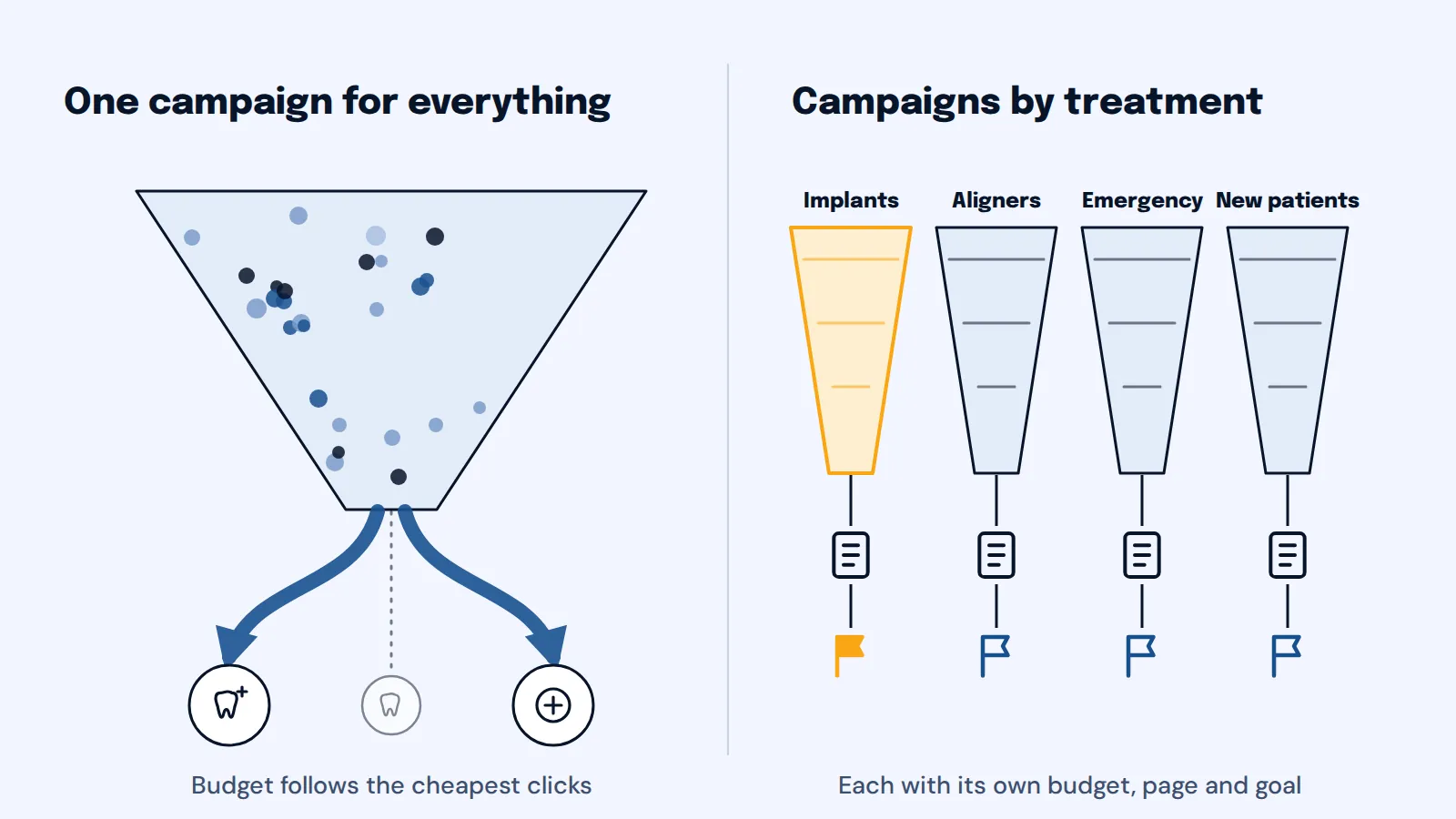
When every treatment shares one budget, spend drifts toward the cheapest conversions instead of the most valuable ones.
Separating campaigns also separates the conversations. Someone weighing a full-arch implant is deciding whether they are a candidate and how to pay for it. Someone comparing aligners wants a price range and a timeline. Someone with a cracked molar at 7 am wants a phone number. Each of those people needs a different ad and a different page, which is why treatment-level structure sits at the center of every healthcare marketing account we run.
What each dental PPC campaign has to answer
What do you need before you launch dental Google Ads?
Before you launch, you need four things. Tracking that counts calls, forms and booked consultations. A landing page for each treatment you advertise. A front desk that answers new-patient calls and forms within minutes. And a budget split by treatment. Without them the ads still spend, but nobody can say what the money bought.
- Conversion actions for calls from ads, calls from the website, form submissions and booked consultations, with the booked consultation set as the primary goal.
- A dedicated landing page for implants and another for aligners. The homepage does not count, however good the waiting room photo is.
- Tracked phone numbers on ads and pages so you can hear which campaigns bring real patients. Our glossary explains how call tracking works.
- A written speed-to-lead rule: who calls back each form, how fast, and what happens after hours.
- A monthly budget for each treatment and a target cost per booked consultation (Step 1 shows how to set it).
- Tracking that keeps patient information away from ad platforms, starting with no browser pixels on booking or intake pages.
That last item deserves its own paragraph. Dental practices are covered entities under HIPAA. The U.S. Department of Health and Human Services has published guidance on online tracking technologies for covered entities. The safe default: keep ad pixels off pages where patients book or share health details, and send ad platforms outcomes, not people. Our guide to HIPAA and website tracking covers the changes in detail, and our HIPAA-compliant marketing team can audit an existing setup.
How to run dental PPC: 9 steps
To run dental PPC that books implant and aligner patients, start with a goal: cost per booked consultation. Split campaigns by treatment and build keywords by intent, with strong negatives. Write ads that answer cost and candidacy, and give each treatment its own page. Then track bookings, feed outcomes back to Google, bid by treatment and review weekly.
- Set the goal as cost per booked consultation
- Split campaigns by treatment
- Build keyword lists by intent, with negatives
- Write ads that answer cost, candidacy and timing
- Send each treatment to its own landing page
- Track calls, forms and booked consultations
- Send booked outcomes back to Google Ads
- Set budgets and bidding by treatment
- Answer fast, then review weekly
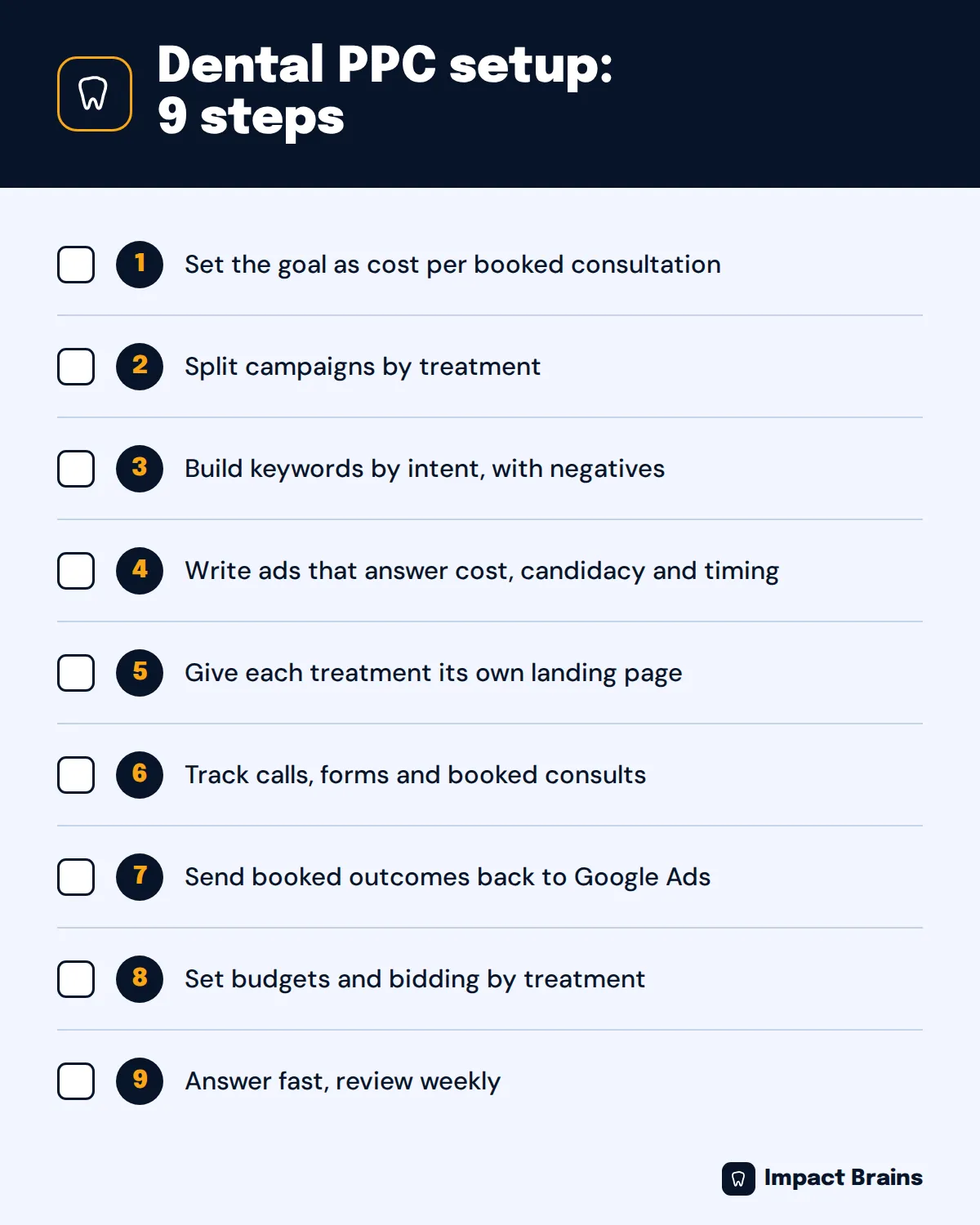
Save this checklist for your next account review; every step maps to a section below.
Step 1: Set the goal as cost per booked consultation
Cost per click tells you what Google charged. Cost per booked consultation tells you what a real conversation with a potential implant patient cost, which is the number your schedule and your accountant care about. Judging an implant campaign by its click price is like judging a crown by how fast the drill spins.
Calculate it per treatment: ad spend for the campaign divided by the consultations it booked. Then go one level deeper with cost per accepted case, which is spend divided by the patients who accepted treatment. Say your implant campaign spends $6,000 in a month and books 15 consultations. That is $400 per booked consultation. If 1 in 3 of those patients accepts a treatment plan, each implant case cost $1,200 in ads.
Whether $1,200 is good depends on your case value, margin and capacity, so the target has to come from your numbers. Our patient acquisition cost calculator does the arithmetic once you plug in your spend, booking rate and acceptance rate.
Step 2: Split campaigns by treatment
Build separate Search campaigns for implants, clear aligners, emergency dentistry, new patients and your brand name. Each one gets its own budget, its own bid target, its own landing page and its own primary conversion. The brand campaign stays separate so cheap clicks from people who already know you don't flatter the numbers of the campaigns doing the hard work.
Example campaign structure for a dental practice
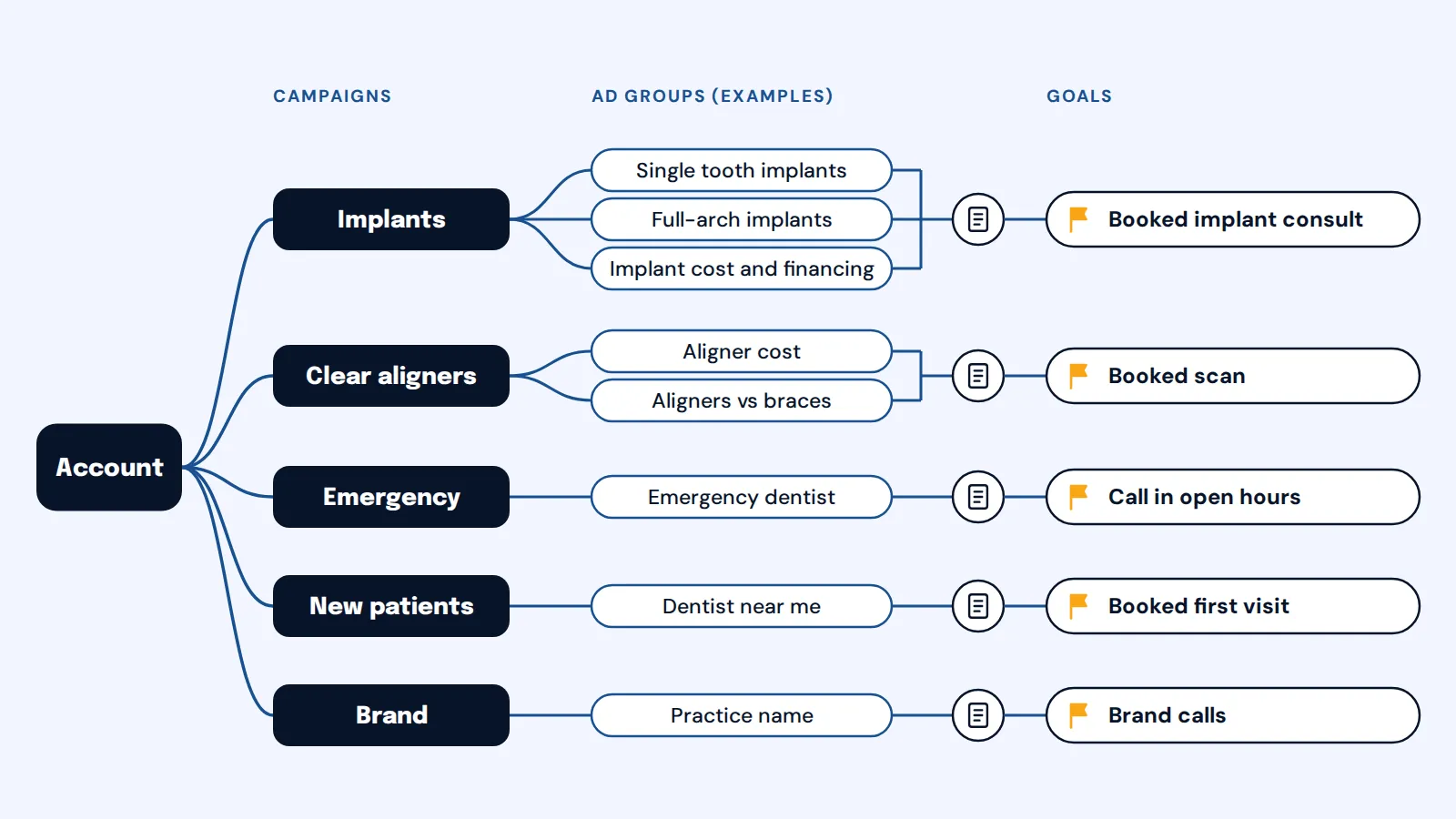
Five campaigns, five landing pages, one primary conversion each: the structure that keeps reporting honest.
Hold off on Performance Max at launch. It runs ads across Google's channels from one campaign, which can be useful later, but it makes it hard to see which searches you paid for and it will gladly take credit for patients who searched your practice name. Performance Max is a confident roommate: it pays some of the bills and won't tell you which ones. Add it once Search campaigns have clean booked-consultation data, with brand exclusions switched on. Our post on Google Ads for doctors covers the wider account setup.
Step 3: Build keyword lists by intent, with negatives
Group keywords by what the searcher is trying to do: treatment plus location (dental implants near me), cost and financing (how much are dental implants), comparisons (implants vs bridge, aligners vs braces) and urgent needs (emergency dentist open now). Start with phrase and exact match. Broad match can work later, once Smart Bidding has a steady flow of booked consultations to learn from; before that it mostly finds creative new ways to spend.
Negative keywords matter as much as the keywords themselves. If your ad shows for dental implant course, you are funding someone's continuing education, which is generous but is not a marketing plan. Add these negative themes before launch and grow the list from the search terms report every week:
- Jobs and careers: jobs, careers, hiring, salary, assistant, hygienist school.
- Education: course, training, CE credits, certification, textbook.
- Trade and supply: lab, wholesale, supplier, parts, manufacturer.
- DIY and at-home: at-home kit, mail order, DIY (unless you sell them).
- Anything you don't offer: specific procedures, insurance plans you don't accept, and pediatric terms if you only treat adults
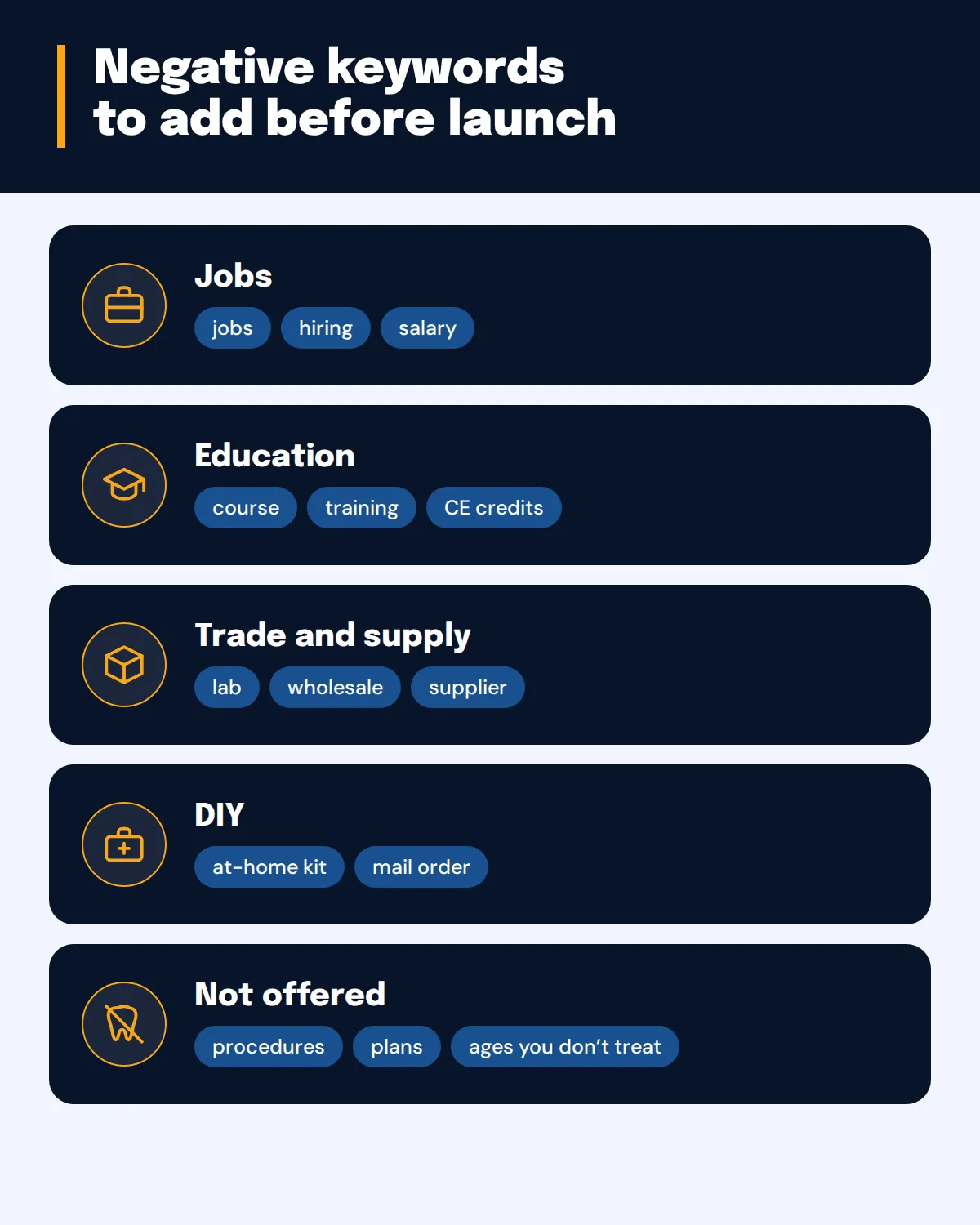
Add these themes before launch, then grow the list from the search terms report every week.
Step 4: Write ads that answer cost, candidacy and timing
Implant and aligner searchers have three questions: how much, am I a candidate, and how long will it take. The best Google Ads for dentists answer at least one of them, and they win more qualified clicks than ads that only say the practice is friendly. Responsive search ads give you up to 15 headlines of 30 characters and 4 descriptions of 90 characters, so use them for treatment and location, the consultation offer, financing if you offer it, and the doctor's real experience.
Example: implant ad building blocks
Headlines: Dental Implants in {City} · Free Implant Consultation (only if you offer it) · Monthly Payment Plans Available · See If You Are a Candidate · Implants Placed by Dr. {Name}. Descriptions: Book a consultation to check candidacy, see your options and get a written cost estimate. Assets: sitelinks to Implant Cost, Financing, What to Expect and Reviews; a call asset during open hours; a location asset.
Healthcare ads follow Google's healthcare and medicines policy, so keep every
claim verifiable, avoid outcome guarantees, and don't mention prescription
drugs in ad text. Our breakdown of Google Ads healthcare policies is updated
monthly with the changes that affect practices.
Step 5: Send each treatment to its own landing page
Sending implant clicks to the homepage is like answering how much is a crown with a tour of the building. A treatment landing page answers the exact question in the ad and makes booking the obvious next step. For implants that means candidacy, the process and timeline, a cost range or financing options, the doctor's credentials, reviews and a short consultation form. For aligners it means price, treatment time, a comparison with braces and scan booking.

Implant patients often research for weeks, usually on a phone, so the landing page has to answer cost and candidacy fast.
Most of these visitors arrive on a phone, often in the evening, after reading three other practices' pages. The page has to load fast, show the phone number and the form without scrolling, and answer the money question before the patient goes looking for it elsewhere. Our landing page design work for healthcare follows the same idea as our post on why facelift patients rarely convert on service pages: one procedure, one page, one action.
- Headline that repeats the treatment and city from the ad.
- Click-to-call button and a short form (name, phone, email, preferred time) above the fold.
- Cost range or monthly payment options in plain numbers you can stand behind.
- Who is a good candidate, and what happens at the first visit.
- Doctor photo and credentials, plus recent reviews.
- A short FAQ covering pain, recovery time and financing.
Step 6: Track calls, forms and booked consultations
Dental PPC tracking has three layers. First, calls: calls from ads through Google's call assets and calls from the website through tracked numbers. Second, form submissions on each landing page. Third, the outcome that matters, a consultation booked in your schedule or CRM. Set up the first two with GA4 and Google Tag Manager tracking, and mark only the booked consultation as the primary conversion once it flows back (Step 7).
Keep identifiers and health details out of browser tags on booking pages. A server-side container lets you decide exactly which fields leave your site, which is why we use it on healthcare accounts; our explainer on server-side tracking with sGTM and the Conversions API shows how it works.
Architect's note
When I audit a dental account, I look at the conversion list before the keywords. I usually find a page-view goal, a click-to-call event that fires on desktop, and a form that counts twice, all marked primary. Google is then asked to find more of those, and it does. The fix is unglamorous: one primary conversion per treatment, the booked consultation, fed back from the schedule. Once the algorithm can see which clicks became patients in the chair, it stops buying cheap curiosity and starts buying intent.
Dr. Muhammad Abdullah, Founder & Chief Systems Architect
Step 7: Send booked outcomes back to Google Ads
Google stores a click ID (the GCLID) when someone arrives from an ad. Save it with the lead, and when that lead books or accepts treatment, upload the outcome with the click ID through offline conversion imports. Google then learns which searches produce consultations and cases, without receiving names or treatment details. Our guide to offline conversion tracking for healthcare walks through the setup.
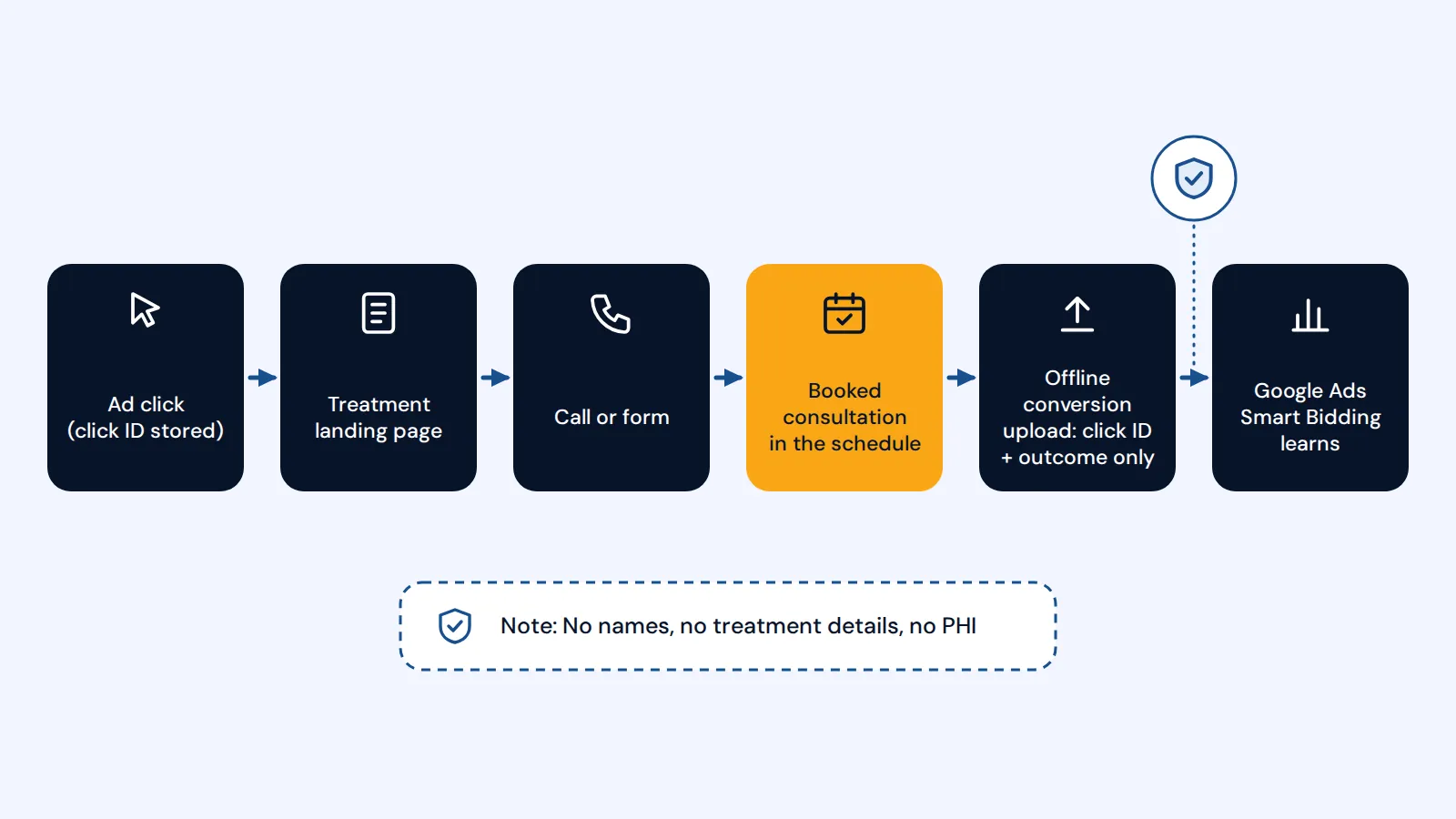
Enhanced conversions work differently: they send hashed customer data such as email addresses. For a covered entity that is a decision for counsel, so we start practices on click-ID-only imports and treat anything beyond that as a compliance question first and a marketing question second.
This step is where results usually move. When we cleaned up the tracking for a facial plastic surgery practice in Washington, D.C. so that bidding optimized for consultation requests, cost per conversion fell from $141.68 to $61.12 and conversions rose from 34 to 99 in three months. It's a different specialty with the same mechanics, documented in the facelift case study.
Step 8: Set budgets and bidding by treatment
Give each campaign its own daily budget based on the consultations you want from it (the budget section below shows the math). Smart Bidding learns from conversion data, so it performs best once a campaign records booked consultations steadily. Until then, run Maximize conversions on a conservative budget or use manual bids, and keep an eye on search terms daily for the first two weeks.
Once the data is steady, switch implants and aligners to target CPA bidding with the cost per booked consultation from Step 1 as the target. Move targets in small steps and give each change a couple of weeks before judging it. Emergency campaigns usually do better with ad schedules that match your opening hours, because a call that rings out after 6 pm is money spent on voicemail.
Step 9: Answer fast, then review weekly
The sentence we'll call them back has probably lost more implant cases than any competitor down the street. Implant and aligner shoppers often contact several practices in one sitting, and the first one to reach them usually books the consultation. Set a speed to lead target for the front desk, route after-hours forms to a text or call sequence, and track missed calls by campaign.

Our post on the patient follow-up system every clinic needs shows how to automate reminders and recalls. Then put a 30-minute review on the calendar every week:
- Search terms report: add negatives, find new exact-match keywords.
- Missed and unanswered calls by campaign and hour.
- Form response time and booking rate by treatment.
- Cost per booked consultation by campaign against target.
- Landing page conversion rate on mobile.
- Policy notices and disapproved ads.
Find out what each booked implant consultation really costs
Get a free, recorded audit of your Google Ads account, tracking, landing pages and follow-up, delivered within two business days. We'll show you where clicks leak before they reach the chair.
How much should a dental practice spend on Google Ads?
A dental practice should set its Google Ads budget by working backward from the cases it wants. Divide target cases by your acceptance, show and booking rates, then multiply by your cost per lead. Click prices vary widely by city, competition and treatment. A budget copied from another practice is a guess; your own rates turn it into a plan.
Illustrative worked example: implant campaign budget
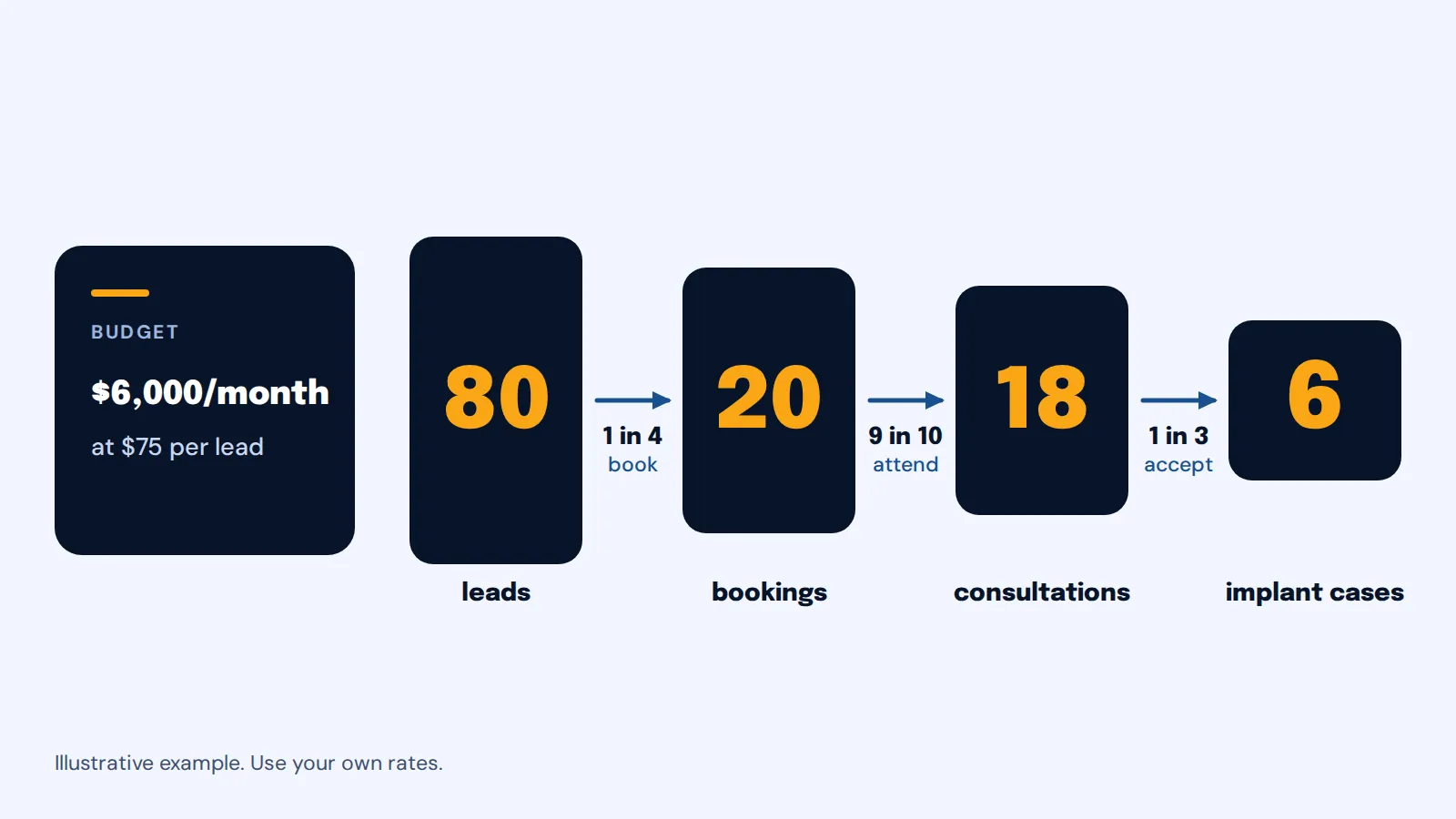
Illustrative numbers: replace each assumption with your own booking, show and acceptance rates.
Notice which numbers do the heavy lifting. Raise the booking rate from 1 in 4 to 1 in 3 and the same six cases need 60 leads instead of 80, which cuts the budget to $4,500. That is why fixing follow-up often lowers acquisition cost faster than any bid change. Run your own numbers in our Google Ads budget calculator before you commit to a monthly figure.
Is dental PPC worth it compared with SEO and Meta ads?
Dental PPC advertising is worth it when you need consultations within weeks and can track them to booked patients. Search ads reach people at the moment they look for a treatment. Local SEO builds slower, cheaper demand over months, and Meta ads create awareness. Most growing practices use PPC for immediate implant and aligner demand while SEO builds underneath.
Dental PPC vs SEO vs Meta ads
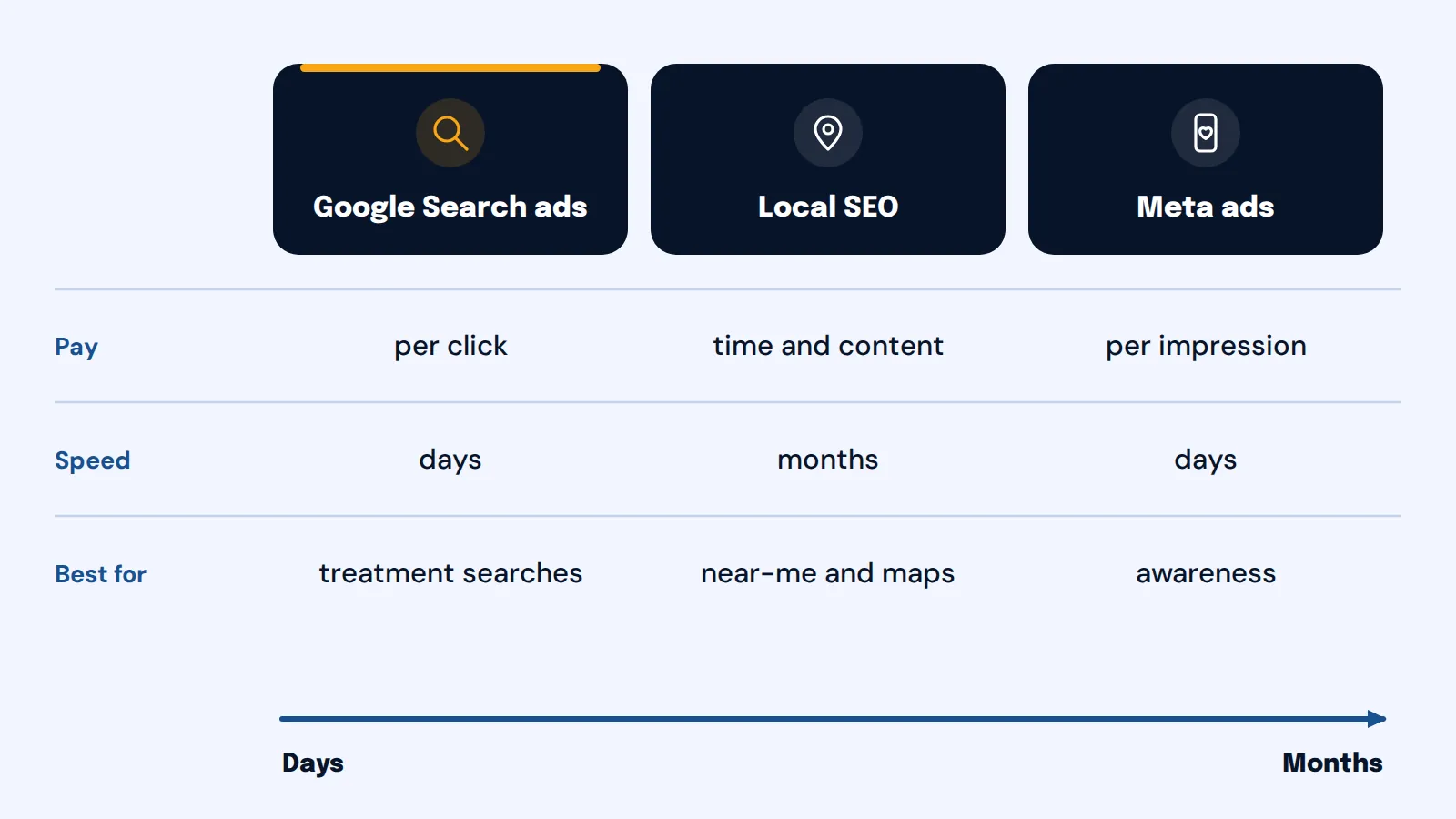
Search ads catch demand now; SEO lowers the cost of that demand over time; Meta builds awareness.
The channels work best as one system: search ads catch demand today, while healthcare SEO makes sure the practice also shows up in the map pack and organic results when patients compare options. A practice that ranks organically for implants usually sees its paid clicks convert better too, because patients recognize the name twice on the same page.
What are the most common dental PPC mistakes?
The most common dental PPC mistakes are mixing treatments in one campaign, counting the wrong conversions and sending clicks to the homepage. Close behind: broad match without negatives, tracking pixels on booking pages and unanswered calls. Each one quietly raises the cost of every consultation. Most can be fixed in a week.
Running one campaign for every treatment
Symptom: lots of conversions, few implant consultations. Cause: one budget and one goal for treatments with very different values. Fix: the five-campaign structure from Step 2, with budgets set by treatment.
Counting the wrong conversions
Symptom: Google reports more conversions than the front desk can find. Cause: page views, duplicate form events and short calls marked as primary. Fix: one primary conversion per campaign, the booked consultation, and everything else set to secondary so it is visible without steering bids.
Sending ad clicks to the homepage
Symptom: good click-through rate, poor conversion rate. Cause: the visitor has to hunt for implant information. Fix: a treatment landing page that answers cost, candidacy and timing, with the phone and form visible straight away.
Letting broad match run without negatives
Symptom: search terms full of jobs, courses and suppliers. Cause: broad match with thin conversion data and no negative list. Fix: phrase and exact match at launch, the negative themes from Step 3, and a weekly search terms review.
Putting tracking pixels on booking pages
Symptom: marketing data flowing to ad platforms from pages where patients share health details. Cause: tags installed site-wide by default. Fix: remove browser pixels from booking and intake pages, move to server-side tracking and send outcomes with click IDs only.
Letting calls ring out
Symptom: calls in the ad report, no matching bookings. Cause: lunch breaks, busy lines and after-hours calls with no follow-up. Fix: ad schedules that match staffed hours, a callback rule measured in minutes, and missed-call alerts by campaign.
How do you know if dental PPC is working?
Dental PPC is working when cost per booked consultation and cost per accepted case stay at or below your targets for each treatment, month after month. The consultations should also show up in the schedule. Clicks, impressions and click-through rate explain why results moved. They are not the results.
Dental PPC metrics that matter
A dashboard full of green arrows can live very comfortably next to an empty consultation calendar, so build the report from the schedule outward. If booking rate drops, look at the phones before the keywords. If acceptance drops, look at consultation quality and pricing before the ads.
Frequently asked questions
How much does dental PPC cost per click?
Dental PPC click costs vary by city, competition and treatment, and implant and aligner terms usually cost more than general dentist searches. Check Google Keyword Planner estimates for your own zip codes, then judge the campaign by cost per booked consultation and cost per accepted case instead of the click price.
Is dental PPC better than dental SEO?
Dental PPC is faster and easier to scale up or down, while SEO builds lower-cost visibility over months. They solve different problems, so most practices run PPC for immediate implant and aligner demand and invest in local SEO at the same time so organic and map results carry more of the load over time.
Can dental practices use remarketing ads?
Remarketing needs care in dentistry. Google restricts personalized advertising based on health, and HIPAA limits what visitor data a practice can share with ad platforms. Check Google's personalized advertising policy for your treatments first, never build audiences from booking or intake pages, and get counsel to review the setup.
How long does dental PPC take to work?
Ads can bring calls within days of approval, but campaigns typically need several weeks of booked-consultation data before keywords and bidding settle. Judge month one on tracking quality and lead quality, and judge cost per booked consultation from the second or third month, once enough outcomes have flowed back to Google.
Should a dental practice use Performance Max for implants?
Start implants on Search campaigns, where you can see the searches you pay for. Performance Max can add reach later, but it blends channels and can take credit for brand searches. Add it once booked-consultation tracking is clean, use brand exclusions, and compare its cost per consultation with Search before moving budget.
Should dental PPC management be in-house or outsourced?
In-house works if someone has time each week for search terms, tracking and landing page tests, plus the skills to connect bookings back to Google Ads. Outsourcing makes sense when nobody owns those tasks. Either way, insist on reporting in cost per booked consultation and keep ownership of the ad account.
What to do next with your dental PPC
Dental PPC pays off when the whole chain works: the right search, a matching ad, a page that answers what the patient asked, a fast reply and an outcome Google can learn from. If your account is running today, start with three checks this week. Look at the conversion list and keep only booked consultations as primary. Split implants and aligners into their own campaigns and pages if they share one. Measure how fast new-patient calls and forms get answered, by hour.
Impact Brains is a marketing systems agency that builds the ads, conversion websites, server-side tracking and CRM automation behind growth, and measures all of it to booked patients, jobs and orders. If you would like a second pair of eyes on your dental PPC, we will record an audit of your account, tracking and follow-up and show you the cost per booked consultation you are actually paying.
See where your practice is losing patients
Get a free, recorded audit of your ads, tracking, website and follow-up, delivered within two business days.

Keep reading
- Cosmetic Surgery Marketing: 12 Strategies That Book Consultations
- Healthcare Website Design: What High-Converting Medical Websites Need in 2026
- Why Your Clinic Website Gets Traffic But No Appointments
- How Much Should Local Businesses Spend on Google Ads? (2026 Budget Guide)
Sources
- Google Ads Help: Healthcare and medicines policy (accessed 2026-10-25)
- Google Ads Help: About Performance Max campaigns (accessed 2026-10-25)
- Google Ads Help: About Smart Bidding (accessed 2026-10-25)
- Google Ads Help: About offline conversion imports (accessed 2026-10-25)
- Google Ads Help: About enhanced conversions (accessed 2026-10-25)
- U.S. Department of Health and Human Services: Use of Online Tracking Technologies by HIPAA Covered Entities and Business Associates (accessed 2026-10-25)
- Impact Brains: Facial plastic surgery Google Ads case study (accessed 2026-10-25)
This article is educational marketing guidance, not legal or medical advice. Confirm compliance decisions with qualified counsel.