
By Dr. Muhammad Abdullah, Pharm.D, MBA, Founder & Chief Systems Architect
Last updated: November 12, 2026 · 5 min read
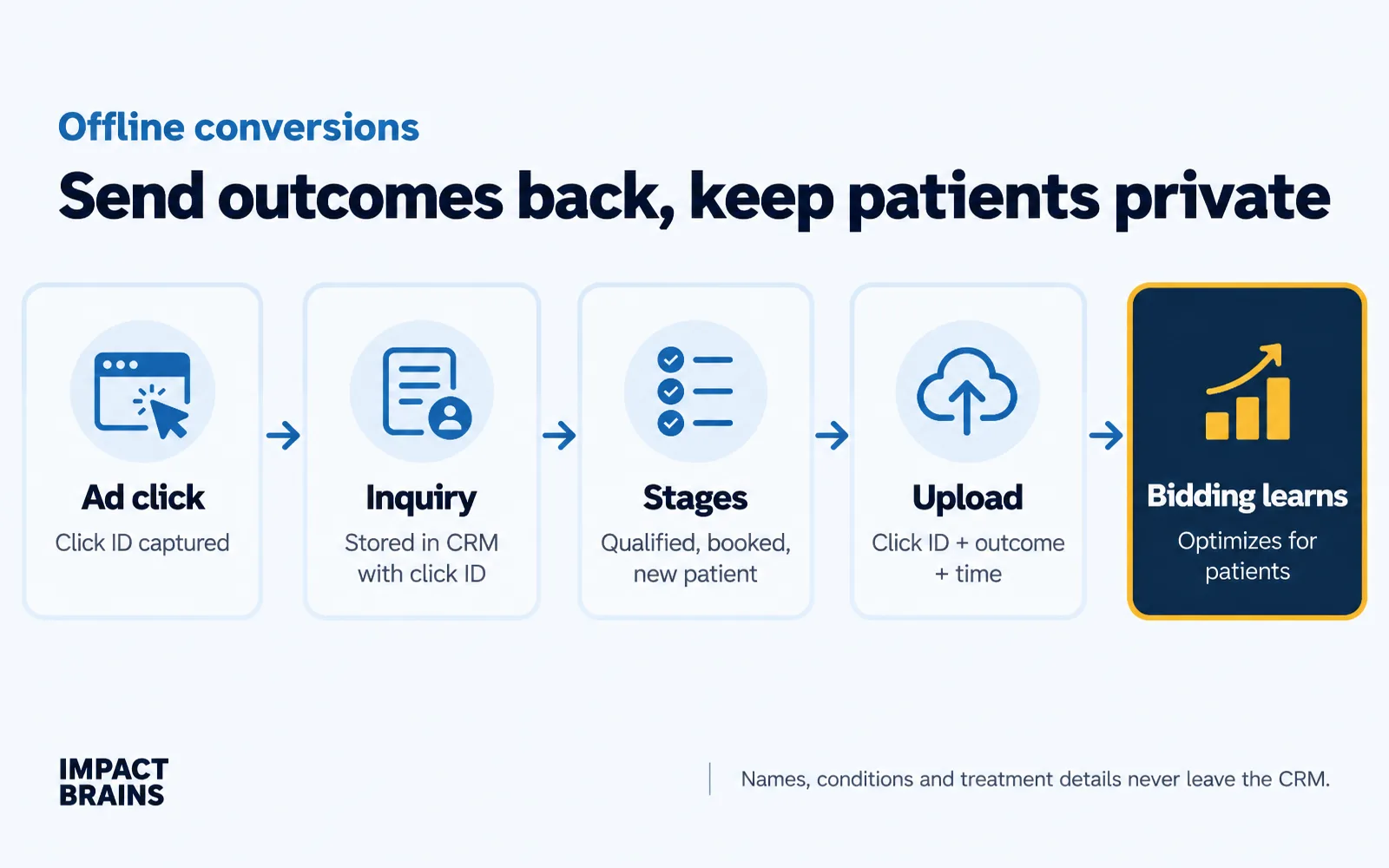
Offline conversion tracking sends outcomes that happen after the click, such as a booked consultation or a new patient, from your CRM back to Google Ads and Meta. For healthcare, send only the click ID, the conversion name, a timestamp and optionally a value, never names, conditions or treatment details. Bidding then optimizes for patients instead of form fills.
- Capture the click ID (gclid, gbraid, wbraid or fbclid) when the inquiry arrives and store it in your CRM.
- Define stages: qualified, booked, showed, new patient. Each can be its own offline conversion.
- Upload click ID + conversion name + time (+ value) only. No PHI.
- Expect smarter bidding within weeks as outcome data accumulates.
In this article
What is offline conversion tracking?
An offline conversion is an outcome that happens after the click and outside the website: a qualified phone call, a booked consultation, a patient who showed up, a treatment that started. Offline conversion tracking uploads those outcomes back to the ad platform so it can see which clicks produced real results.
Why does offline conversion tracking matter for practices?
Because ad platforms optimize toward whatever you tell them is a conversion. If that is a form submission, bidding learns to buy form submissions, including spam, price-shoppers and wrong numbers. Tell it about booked consultations and new patients, and it learns to find more people like them.
In our Washington, D.C. facial plastic surgery account, separating calls, forms and booked consults was one of the changes that took cost per conversion from $141.68 to $61.12.
How do you send offline conversions without PHI?
Send the minimum. Google Ads offline imports need the click ID, the conversion action name and the conversion time; value is optional. That is enough to attribute the outcome, and none of it describes a patient’s health.
| Send | Never send |
|---|---|
| Click ID (gclid, gbraid, wbraid, fbclid) | Patient name, email or phone (unless reviewed with counsel and covered) |
| Conversion name (for example, “Consult booked”) | Diagnosis, condition or treatment details |
| Conversion time | Appointment notes or intake answers |
| Value (optional, average or estimated) | Insurance or payment details |
Some platforms offer matching on hashed email or phone (enhanced conversions, Meta’s customer information parameters). Hashing is not anonymization; in healthcare, use these only after counsel review.
See where your practice is losing patientsGet a free recorded audit of your ads, website, tracking and follow-up from the team that builds the Patient Acquisition System, with the three fixes that will move your numbers fastest.
Get my free patient growth audit →How do you set up offline conversions for Google Ads?
- Turn on auto-tagging.Google Ads adds a click ID to every ad click.
- Capture the click ID.A hidden form field or your call-tracking tool stores it with each inquiry.
- Create CRM stages.Qualified, booked, showed, new patient, each with a timestamp.
- Create conversion actions.One offline action per stage you want to optimize toward.
- Upload on a schedule.Daily upload via your CRM integration, an API connection or a scheduled file.
- Shift bidding.Once volume is steady, optimize toward booked consultations or new patients.
How does this work on Meta?
Meta receives offline events through the Conversions API. Capture the fbclid (stored as the fbc parameter) at inquiry and send stage events from your server or CRM. Since 2025, many health advertisers have restricted lower-funnel data on Meta, so check what your account is allowed to send.
What are common offline conversion mistakes?
- Not capturing the click ID at the first touch, so nothing can be matched later.
- Uploading outcomes weeks late, after the click is outside the import window.
- Counting the same patient twice across stages as primary conversions.
- Sending contact details or notes in the upload file.
Related: the Patient Acquisition System and Why businesses waste ad spend without proper GA4 and GTM.
See where your practice is losing patientsGet a free recorded audit of your ads, website, tracking and follow-up from the team that builds the Patient Acquisition System, with the three fixes that will move your numbers fastest.
Get my free patient growth audit →Frequently asked questions
What is an offline conversion?
An outcome that happens after the click and outside the website, such as a qualified call, booked consultation or new patient, uploaded back to the ad platform.
Can healthcare practices use offline conversions without violating HIPAA?
Yes, when uploads contain only the click ID, conversion name, time and optional value, and no patient identifiers or health details. Review the setup with counsel.
How long does Google take to use offline conversion data?
Uploads appear within a day; bidding typically needs several weeks of steady volume before it optimizes reliably toward offline actions.
Do I need a CRM for offline conversions?
You need somewhere that stores the click ID and the outcome. A CRM is the usual place; a booking system or spreadsheet can work at small scale.
Can I import offline conversions into Meta?
Yes, through the Conversions API, subject to the data restrictions that apply to your account category.
This article is educational marketing guidance, not legal or medical advice. Confirm advertising and privacy decisions with your own counsel.
By Dr. Muhammad Abdullah, Pharm.D, MBA, Founder & Chief Systems Architect
Last updated: November 12, 2026 · 5 min read
Offline conversion tracking sends outcomes that happen after the click, such as a booked consultation or a new patient, from your CRM back to Google Ads and Meta. For healthcare, send only the click ID, the conversion name, a timestamp and optionally a value, never names, conditions or treatment details. Bidding then optimizes for patients instead of form fills.
- Capture the click ID (gclid, gbraid, wbraid or fbclid) when the inquiry arrives and store it in your CRM.
- Define stages: qualified, booked, showed, new patient. Each can be its own offline conversion.
- Upload click ID + conversion name + time (+ value) only. No PHI.
- Expect smarter bidding within weeks as outcome data accumulates.
In this article
What is offline conversion tracking?
An offline conversion is an outcome that happens after the click and outside the website: a qualified phone call, a booked consultation, a patient who showed up, a treatment that started. Offline conversion tracking uploads those outcomes back to the ad platform so it can see which clicks produced real results.
Why does offline conversion tracking matter for practices?
Because ad platforms optimize toward whatever you tell them is a conversion. If that is a form submission, bidding learns to buy form submissions, including spam, price-shoppers and wrong numbers. Tell it about booked consultations and new patients, and it learns to find more people like them.
In our Washington, D.C. facial plastic surgery account, separating calls, forms and booked consults was one of the changes that took cost per conversion from $141.68 to $61.12.
How do you send offline conversions without PHI?
Send the minimum. Google Ads offline imports need the click ID, the conversion action name and the conversion time; value is optional. That is enough to attribute the outcome, and none of it describes a patient’s health.
| Send | Never send |
|---|---|
| Click ID (gclid, gbraid, wbraid, fbclid) | Patient name, email or phone (unless reviewed with counsel and covered) |
| Conversion name (for example, “Consult booked”) | Diagnosis, condition or treatment details |
| Conversion time | Appointment notes or intake answers |
| Value (optional, average or estimated) | Insurance or payment details |
Some platforms offer matching on hashed email or phone (enhanced conversions, Meta’s customer information parameters). Hashing is not anonymization; in healthcare, use these only after counsel review.
See where your practice is losing patientsGet a free recorded audit of your ads, website, tracking and follow-up from the team that builds the Patient Acquisition System, with the three fixes that will move your numbers fastest.
Get my free patient growth audit →How do you set up offline conversions for Google Ads?
- Turn on auto-tagging.Google Ads adds a click ID to every ad click.
- Capture the click ID.A hidden form field or your call-tracking tool stores it with each inquiry.
- Create CRM stages.Qualified, booked, showed, new patient, each with a timestamp.
- Create conversion actions.One offline action per stage you want to optimize toward.
- Upload on a schedule.Daily upload via your CRM integration, an API connection or a scheduled file.
- Shift bidding.Once volume is steady, optimize toward booked consultations or new patients.
How does this work on Meta?
Meta receives offline events through the Conversions API. Capture the fbclid (stored as the fbc parameter) at inquiry and send stage events from your server or CRM. Since 2025, many health advertisers have restricted lower-funnel data on Meta, so check what your account is allowed to send.
What are common offline conversion mistakes?
- Not capturing the click ID at the first touch, so nothing can be matched later.
- Uploading outcomes weeks late, after the click is outside the import window.
- Counting the same patient twice across stages as primary conversions.
- Sending contact details or notes in the upload file.
Related: the Patient Acquisition System and Why businesses waste ad spend without proper GA4 and GTM.
See where your practice is losing patientsGet a free recorded audit of your ads, website, tracking and follow-up from the team that builds the Patient Acquisition System, with the three fixes that will move your numbers fastest.
Get my free patient growth audit →Frequently asked questions
What is an offline conversion?
An outcome that happens after the click and outside the website, such as a qualified call, booked consultation or new patient, uploaded back to the ad platform.
Can healthcare practices use offline conversions without violating HIPAA?
Yes, when uploads contain only the click ID, conversion name, time and optional value, and no patient identifiers or health details. Review the setup with counsel.
How long does Google take to use offline conversion data?
Uploads appear within a day; bidding typically needs several weeks of steady volume before it optimizes reliably toward offline actions.
Do I need a CRM for offline conversions?
You need somewhere that stores the click ID and the outcome. A CRM is the usual place; a booking system or spreadsheet can work at small scale.
Can I import offline conversions into Meta?
Yes, through the Conversions API, subject to the data restrictions that apply to your account category.
This article is educational marketing guidance, not legal or medical advice. Confirm advertising and privacy decisions with your own counsel.