How Much Should Local Businesses Spend on Google Ads? The 2026 Budget Guide
Too little and Google's algorithm never learns. Too much and you burn budget without a strategy. This guide gives you real numbers, by industry, so you can set a budget that actually returns results — not just clicks.
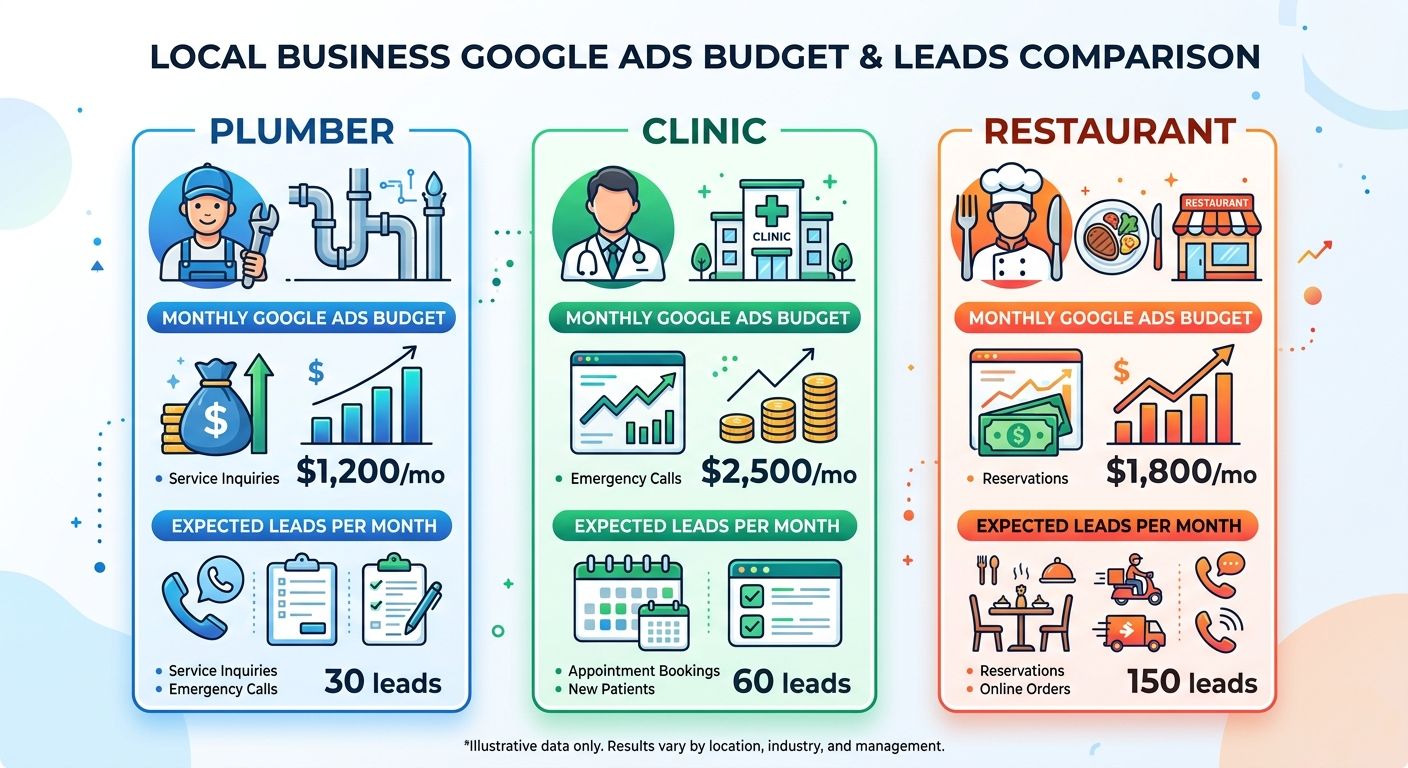
Why There's No One-Size-Fits-All Budget
Every agency you ask will give you a different number. That's not because they're guessing — it's because the right Google Ads budget is genuinely different for a local bakery versus a personal injury law firm. The inputs that determine your number are industry, competition, average customer value, and your conversion goals.
That said, there are evidence-based starting points. The worst thing you can do is underspend — a budget that's too small means Google's AI never collects enough data to optimise, your ads show inconsistently, and you draw the wrong conclusion that "Google Ads doesn't work."
"If you had taken $12,000 and spread it across a full year at $1,000/month, you'd likely get modest results. Invested in a single quarter at $4,000/month, you'd get a real answer on whether the channel works — and enough data to optimise from."
Average CPCs by Industry (2026)
Your industry's average cost per click is the single biggest driver of how much budget you need. A pet groomer paying $1.05/click needs a very different budget than a personal injury lawyer paying $9+. Here's where the main local business categories sit:
A Quality Score of 7+ can reduce your effective CPC by 30–50% compared to a score of 4. Improving your landing page relevance and ad copy alignment is the single best way to get more from the same budget.
💡 Not sure what your industry's real CPC is? We'll pull the data for your specific keywords — free.
Get Keyword CPC Analysis →Budget Benchmarks by Business Size
These ranges are based on industry data and campaign performance across hundreds of local businesses. Treat them as starting points, not ceilings.
| Business Type | Monthly Budget | Daily Budget | Expected Clicks | Fit For |
|---|---|---|---|---|
| Micro-local 1 location, tight area |
$500–$800 | $16–$26/day | 400–700 | Low-CPC niches only |
| Small Local Business 1–3 locations |
$1,000–$3,000 | $33–$99/day | 500–2,000 | Most service businesses |
| Growing Local Brand 3–10 locations or premium niche |
$3,000–$8,000 | $100–$263/day | 1,500–5,000 | Healthcare, home services |
| Competitive Local Market Dense city or high-CPC niche |
$5,000–$10,000 | $165–$330/day | 2,500–8,000 | Legal, finance, cosmetic |
| Aggressive Growth Mode Dominating a market |
$10,000+ | $330+/day | 8,000+ | Legal, national local chains |
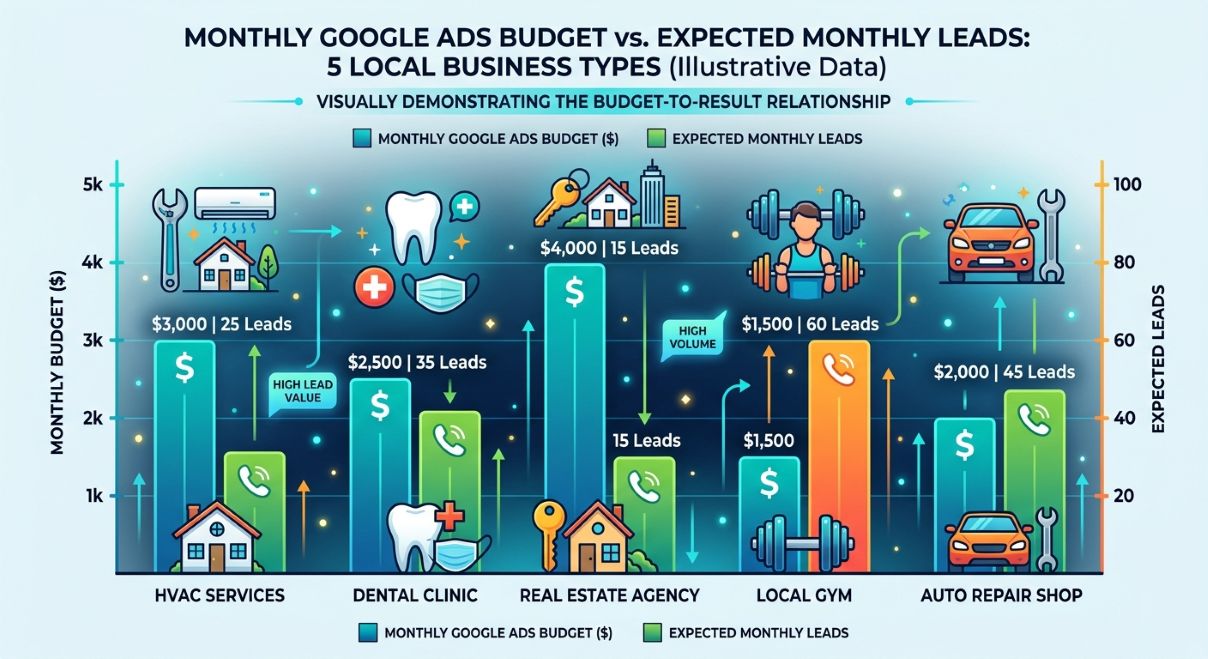
The 5 Factors That Should Drive Your Budget
Beyond industry benchmarks, your specific situation should shape your number. Here are the five variables that matter most:
1 — Your Average Customer Value (ACV)
If a new customer is worth $50, you can afford to spend $10–$15 per lead. If a customer is worth $5,000 (think dental implants or a kitchen remodel), you can justify $300+ per lead and still be profitable. Always calculate your maximum allowable cost per lead before setting a budget.
Average Customer Value × Profit Margin × Conversion Rate = Max Cost Per Lead. Example: $2,000 ACV × 35% margin × 20% close rate = $140 max CPL. If your ads bring leads at $80 each, you're in profit.
2 — Your Local Competition Level
In Google Keyword Planner, keywords are rated Low, Medium, or High competition. High-competition keywords in dense markets require larger budgets or a significantly higher Quality Score. If 10 local competitors are all bidding on "emergency dentist [city]", underspending is not a strategy — it's invisible.
3 — Your Campaign Maturity
A brand-new campaign needs a 90-day testing budget — Google's AI (Smart Bidding) requires a minimum of 30–50 conversions to exit the learning phase and optimise properly. Don't judge a campaign's performance before it's had time to learn. Starting too lean and cutting the budget before learning completes is the #1 reason local campaigns fail.
4 — Desired Market Share
If you want to dominate your area — appearing for 80%+ of searches for your core keywords — you need a budget that achieves high Impression Share. Checking your "Search Impression Share" in Google Ads tells you exactly how much of the available impressions you're capturing and how much budget increase would be needed to close the gap.
5 — The 70/20/10 Budget Allocation Rule
- 70% — Evergreen campaigns — your proven bottom-of-funnel terms like "plumber near me" or "book dental appointment"
- 20% — Expansion — slightly broader but still relevant keywords or new service areas you want to test
- 10% — Experiments — new features like AI Max campaigns, Demand Gen ads, or competitor keywords
Not Sure How to Structure Your Campaigns?
Our team builds and manages Google Ads campaigns for local businesses from scratch — strategy, setup, and ongoing optimisation included.
Get a Free Campaign Audit →Interactive Budget Calculator
Adjust the inputs below to get a rough monthly budget estimate for your business. This is a starting-point guide — not a guarantee.
Select your industry and target monthly leads to see a recommended budget range.
How to Make Every Dollar Work Harder
Budget size is only half the equation. Here's how to squeeze maximum output from whatever you invest:
Target Hyper-Local First
Instead of targeting your entire city, start with your highest-value postcodes or neighbourhoods. Lower competition = lower CPC = more clicks for the same budget. Once you're profitable in those areas, expand outward.
Use Ad Scheduling (Dayparting)
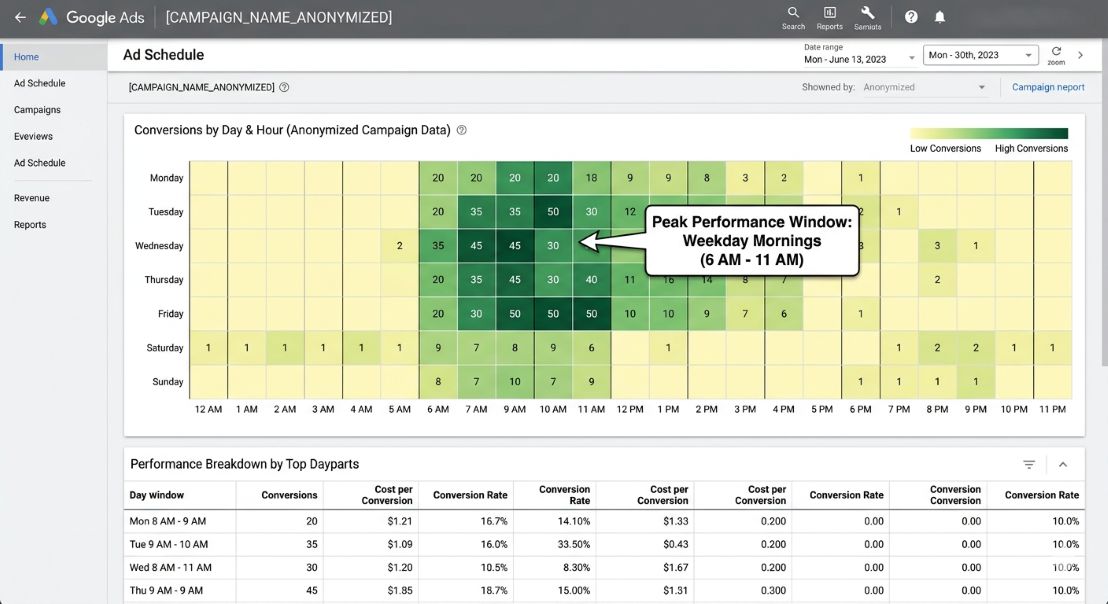
Analyse which hours and days your leads convert. Most local businesses see peak intent on weekday mornings and Sunday evenings. Reduce bids by 30–50% during low-conversion periods and reinvest that budget into your peak hours.
Match Landing Pages to Ad Intent
The #1 wasted spend in local Google Ads is sending all clicks to a generic homepage. Every ad group should have a dedicated landing page that exactly matches the search intent — if someone clicks "emergency plumber [city]", they should land on a page that says "Emergency Plumber in [City]" with a click-to-call button above the fold.
- Headline matches the ad copy — the visitor should feel an immediate "yes, this is what I searched for"
- Click-to-call button visible without scrolling on mobile
- Social proof (reviews, star ratings) visible in the first section
- One clear CTA — no navigation menu distractions
🚀 Need landing pages that actually convert? We build high-converting pages built for Google Ads traffic.
See Landing Page Services →Common Budget Mistakes (And How to Avoid Them)
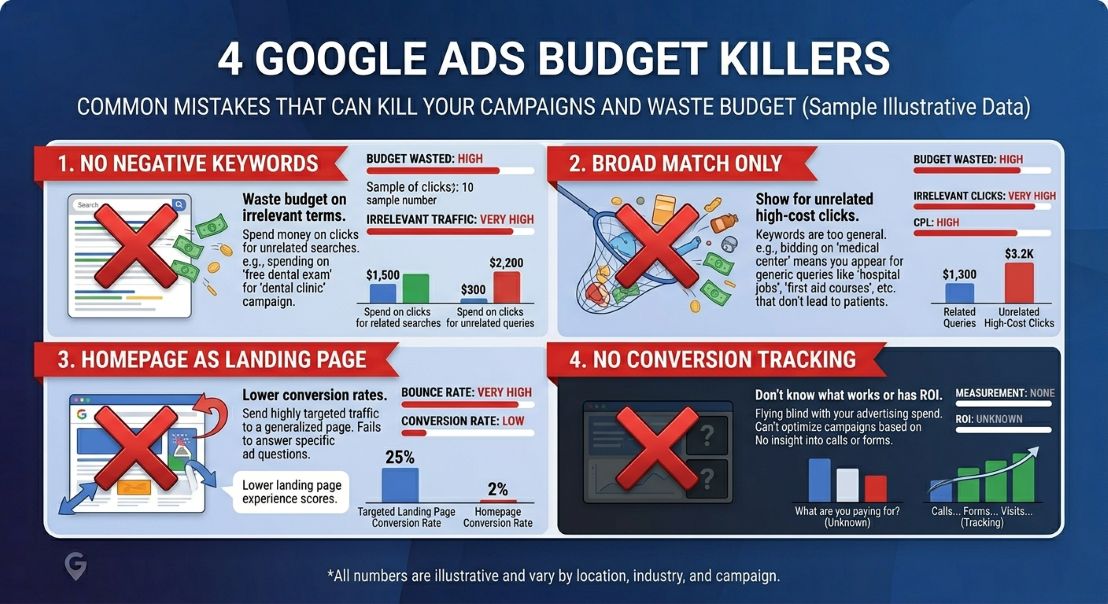
$12,000 spread over 12 months at $1,000/month rarely produces meaningful data. Concentrated at $4,000/month for a quarter, you get real optimisation data and a true picture of the channel's potential.
Broad and phrase match campaigns will show your ads for irrelevant searches without a negative keyword list. A plumber bidding on "plumbing jobs" will get clicks from job seekers, not customers. Audit your search term report weekly and add negatives aggressively.
Running Google Ads without conversion tracking is like driving without a dashboard. If you can't see which keywords and ads are generating leads, you can't optimise. Set up call tracking and form submission tracking before you spend a single dollar.
Frequently Asked Questions
Stop Guessing — Start Growing
ImpactBrains manages Google Ads for local businesses across healthcare, home services, and e-commerce. We set the right budget, build the right campaigns, and report on results that actually matter — leads and revenue, not just clicks.
How Much Should Local Businesses Spend on Google Ads? The 2026 Budget Guide
Too little and Google's algorithm never learns. Too much and you burn budget without a strategy. This guide gives you real numbers, by industry, so you can set a budget that actually returns results — not just clicks.
Why There's No One-Size-Fits-All Budget
Every agency you ask will give you a different number. That's not because they're guessing — it's because the right Google Ads budget is genuinely different for a local bakery versus a personal injury law firm. The inputs that determine your number are industry, competition, average customer value, and your conversion goals.
That said, there are evidence-based starting points. The worst thing you can do is underspend — a budget that's too small means Google's AI never collects enough data to optimise, your ads show inconsistently, and you draw the wrong conclusion that "Google Ads doesn't work."
"If you had taken $12,000 and spread it across a full year at $1,000/month, you'd likely get modest results. Invested in a single quarter at $4,000/month, you'd get a real answer on whether the channel works — and enough data to optimise from."
Average CPCs by Industry (2026)
Your industry's average cost per click is the single biggest driver of how much budget you need. A pet groomer paying $1.05/click needs a very different budget than a personal injury lawyer paying $9+. Here's where the main local business categories sit:
A Quality Score of 7+ can reduce your effective CPC by 30–50% compared to a score of 4. Improving your landing page relevance and ad copy alignment is the single best way to get more from the same budget.
💡 Not sure what your industry's real CPC is? We'll pull the data for your specific keywords — free.
Get Keyword CPC Analysis →Budget Benchmarks by Business Size
These ranges are based on industry data and campaign performance across hundreds of local businesses. Treat them as starting points, not ceilings.
| Business Type | Monthly Budget | Daily Budget | Expected Clicks | Fit For |
|---|---|---|---|---|
| Micro-local 1 location, tight area |
$500–$800 | $16–$26/day | 400–700 | Low-CPC niches only |
| Small Local Business 1–3 locations |
$1,000–$3,000 | $33–$99/day | 500–2,000 | Most service businesses |
| Growing Local Brand 3–10 locations or premium niche |
$3,000–$8,000 | $100–$263/day | 1,500–5,000 | Healthcare, home services |
| Competitive Local Market Dense city or high-CPC niche |
$5,000–$10,000 | $165–$330/day | 2,500–8,000 | Legal, finance, cosmetic |
| Aggressive Growth Mode Dominating a market |
$10,000+ | $330+/day | 8,000+ | Legal, national local chains |
The 5 Factors That Should Drive Your Budget
Beyond industry benchmarks, your specific situation should shape your number. Here are the five variables that matter most:
1 — Your Average Customer Value (ACV)
If a new customer is worth $50, you can afford to spend $10–$15 per lead. If a customer is worth $5,000 (think dental implants or a kitchen remodel), you can justify $300+ per lead and still be profitable. Always calculate your maximum allowable cost per lead before setting a budget.
Average Customer Value × Profit Margin × Conversion Rate = Max Cost Per Lead. Example: $2,000 ACV × 35% margin × 20% close rate = $140 max CPL. If your ads bring leads at $80 each, you're in profit.
2 — Your Local Competition Level
In Google Keyword Planner, keywords are rated Low, Medium, or High competition. High-competition keywords in dense markets require larger budgets or a significantly higher Quality Score. If 10 local competitors are all bidding on "emergency dentist [city]", underspending is not a strategy — it's invisible.
3 — Your Campaign Maturity
A brand-new campaign needs a 90-day testing budget — Google's AI (Smart Bidding) requires a minimum of 30–50 conversions to exit the learning phase and optimise properly. Don't judge a campaign's performance before it's had time to learn. Starting too lean and cutting the budget before learning completes is the #1 reason local campaigns fail.
4 — Desired Market Share
If you want to dominate your area — appearing for 80%+ of searches for your core keywords — you need a budget that achieves high Impression Share. Checking your "Search Impression Share" in Google Ads tells you exactly how much of the available impressions you're capturing and how much budget increase would be needed to close the gap.
5 — The 70/20/10 Budget Allocation Rule
- 70% — Evergreen campaigns — your proven bottom-of-funnel terms like "plumber near me" or "book dental appointment"
- 20% — Expansion — slightly broader but still relevant keywords or new service areas you want to test
- 10% — Experiments — new features like AI Max campaigns, Demand Gen ads, or competitor keywords
Not Sure How to Structure Your Campaigns?
Our team builds and manages Google Ads campaigns for local businesses from scratch — strategy, setup, and ongoing optimisation included.
Get a Free Campaign Audit →Interactive Budget Calculator
Adjust the inputs below to get a rough monthly budget estimate for your business. This is a starting-point guide — not a guarantee.
Select your industry and target monthly leads to see a recommended budget range.
How to Make Every Dollar Work Harder
Budget size is only half the equation. Here's how to squeeze maximum output from whatever you invest:
Target Hyper-Local First
Instead of targeting your entire city, start with your highest-value postcodes or neighbourhoods. Lower competition = lower CPC = more clicks for the same budget. Once you're profitable in those areas, expand outward.
Use Ad Scheduling (Dayparting)
Analyse which hours and days your leads convert. Most local businesses see peak intent on weekday mornings and Sunday evenings. Reduce bids by 30–50% during low-conversion periods and reinvest that budget into your peak hours.
Match Landing Pages to Ad Intent
The #1 wasted spend in local Google Ads is sending all clicks to a generic homepage. Every ad group should have a dedicated landing page that exactly matches the search intent — if someone clicks "emergency plumber [city]", they should land on a page that says "Emergency Plumber in [City]" with a click-to-call button above the fold.
- Headline matches the ad copy — the visitor should feel an immediate "yes, this is what I searched for"
- Click-to-call button visible without scrolling on mobile
- Social proof (reviews, star ratings) visible in the first section
- One clear CTA — no navigation menu distractions
🚀 Need landing pages that actually convert? We build high-converting pages built for Google Ads traffic.
See Landing Page Services →Common Budget Mistakes (And How to Avoid Them)
$12,000 spread over 12 months at $1,000/month rarely produces meaningful data. Concentrated at $4,000/month for a quarter, you get real optimisation data and a true picture of the channel's potential.
Broad and phrase match campaigns will show your ads for irrelevant searches without a negative keyword list. A plumber bidding on "plumbing jobs" will get clicks from job seekers, not customers. Audit your search term report weekly and add negatives aggressively.
Running Google Ads without conversion tracking is like driving without a dashboard. If you can't see which keywords and ads are generating leads, you can't optimise. Set up call tracking and form submission tracking before you spend a single dollar.
Frequently Asked Questions
Stop Guessing — Start Growing
ImpactBrains manages Google Ads for local businesses across healthcare, home services, and e-commerce. We set the right budget, build the right campaigns, and report on results that actually matter — leads and revenue, not just clicks.