What Makes a Website HIPAA Compliant?
The Health Insurance Portability and Accountability Act (HIPAA) was signed into law in 1996, but its implications for modern websites are vast — and vastly misunderstood. When most healthcare providers think of HIPAA, they think of patient intake paperwork and medical records. What they don't always realize is that their website is also a point of data collection — and in many cases, a point of serious HIPAA risk.
A HIPAA compliant website is one that meets all applicable requirements under HIPAA's Privacy Rule, Security Rule, and Breach Notification Rule when it comes to the collection, storage, transmission, and management of Protected Health Information (PHI). PHI is any information that can be used to identify a patient and relates to their health condition, healthcare services received, or payment for those services.
HIPAA compliance for websites is governed primarily by two rules:
The Security Rule
Governs how electronic PHI (ePHI) must be protected — including data encryption during transmission and at rest, access controls, audit trails, and technical safeguards. This is the rule most directly relevant to your website's technical architecture.
The Privacy Rule
Dictates what PHI can be used or disclosed, who it can be shared with, and what disclosures must be logged. It requires your website to display a Notice of Privacy Practices and governs consent around testimonials and patient communications.
Together, these rules create a comprehensive framework for how your website should be built, hosted, and managed — from the web forms you use to the third-party tools you install (like analytics platforms and chatbots).
The 7 Core Elements of a HIPAA Compliant Website
Breaking it down to its fundamentals, a truly HIPAA compliant website requires all of the following:
Does Your Medical Website Actually Need to Be HIPAA Compliant?
The short answer: if your website interacts with patients in any way — yes, it almost certainly does. But let's get specific, because the nuance matters enormously.
HIPAA compliance applies to Covered Entities and their Business Associates. A Covered Entity is any healthcare provider, health plan, or healthcare clearinghouse that transmits health information electronically. This includes:
- Medical and dental practices of all sizes
- Hospitals and outpatient clinics
- Mental health and behavioral health providers
- Chiropractors, physical therapists, and occupational therapists
- Pharmacies and pharmacists
- Home health agencies
- Medical billing companies
- Health insurance companies and their brokers
Even a wellness blog or a practice brochure website can inadvertently collect PHI through its contact forms. The critical question isn't what type of site you have — it's whether your site can receive any information that links a person to a health-related matter.
HIPAA Penalties Are Not Hypothetical
The Office for Civil Rights (OCR) within the U.S. Department of Health and Human Services actively investigates HIPAA violations. Civil penalties are tiered by culpability:
| Violation Category | Minimum Fine | Maximum Per Year | Example |
|---|---|---|---|
| Unknown / No Reasonable Cause | $100 per violation | $25,000 | Unencrypted form on your website |
| Reasonable Cause, Not Willful Neglect | $1,000 per violation | $100,000 | No BAA with your website hosting provider |
| Willful Neglect, Corrected | $10,000 per violation | $250,000 | Known vulnerability left unaddressed |
| Willful Neglect, Not Corrected | $50,000 per violation | $1,900,000 | Repeated breaches after documented warning |
Source: U.S. Department of Health and Human Services, Civil Money Penalties (2024 adjusted amounts)
Real Example: Bad vs. Good HIPAA Landing Page Design
Most HIPAA violations on healthcare websites aren't the result of malicious intent — they happen because whoever built the site didn't know what "HIPAA compliant website design" actually means in practice. Below, we break down two real landing pages side by side: one built without HIPAA in mind, and one designed with full compliance from the ground up.
Watch: How to make your website HIPAA compliant — a 10-minute walkthrough comparing a non-compliant and compliant medical landing page
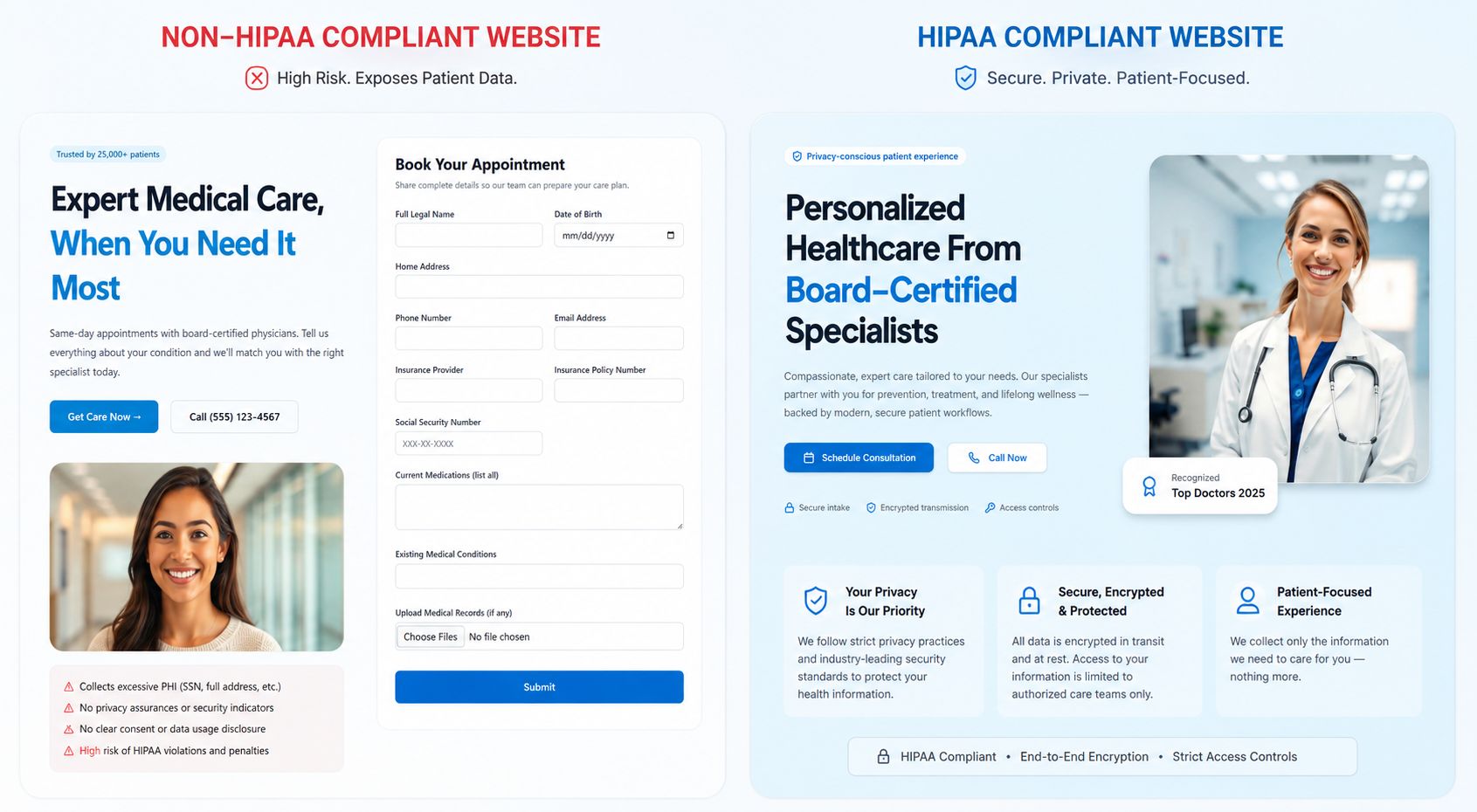
Left: A medical landing page with multiple HIPAA violations (red annotations). Right: The same practice's compliant redesign following HIPAA best practices.
Want Us to Audit Your Website for Free?
ImpactBrains specializes in HIPAA compliant website design for medical practices. We'll identify every compliance gap and send you a detailed report — at no cost.
Get My Free HIPAA AuditThe #1 HIPAA Violation on Medical Websites: Web Forms
If you ask any HIPAA compliance expert what single website element they see violated most often on healthcare websites, the answer is almost always the same: the contact form. Specifically, HIPAA compliant web forms are the single most misunderstood element of healthcare website compliance.
The root of the problem is how standard web forms work. When a visitor fills out a typical WordPress contact form or Wix contact widget and clicks "Submit," that data is transmitted over the internet and typically delivered to the practice's email inbox. If that email is not HIPAA compliant — meaning the email provider hasn't signed a BAA — you have just transmitted PHI through an unsecured channel. Every single submission. Every single day.
What Fields Are Considered PHI on a Web Form?
Not all form fields create a PHI problem. The issue arises when you combine an identifier (like a name or phone number) with any health-related information. Here's a practical breakdown:
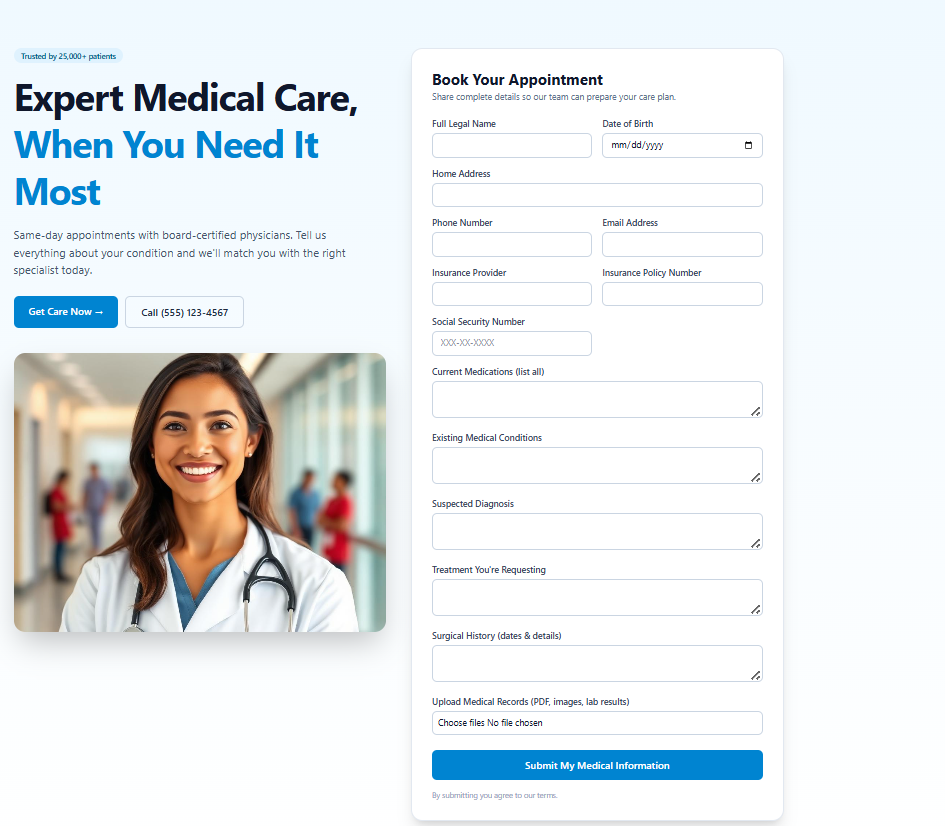
The non-compliant form: collecting excessive PHI, no encryption, no privacy notice, and data routed through standard email.
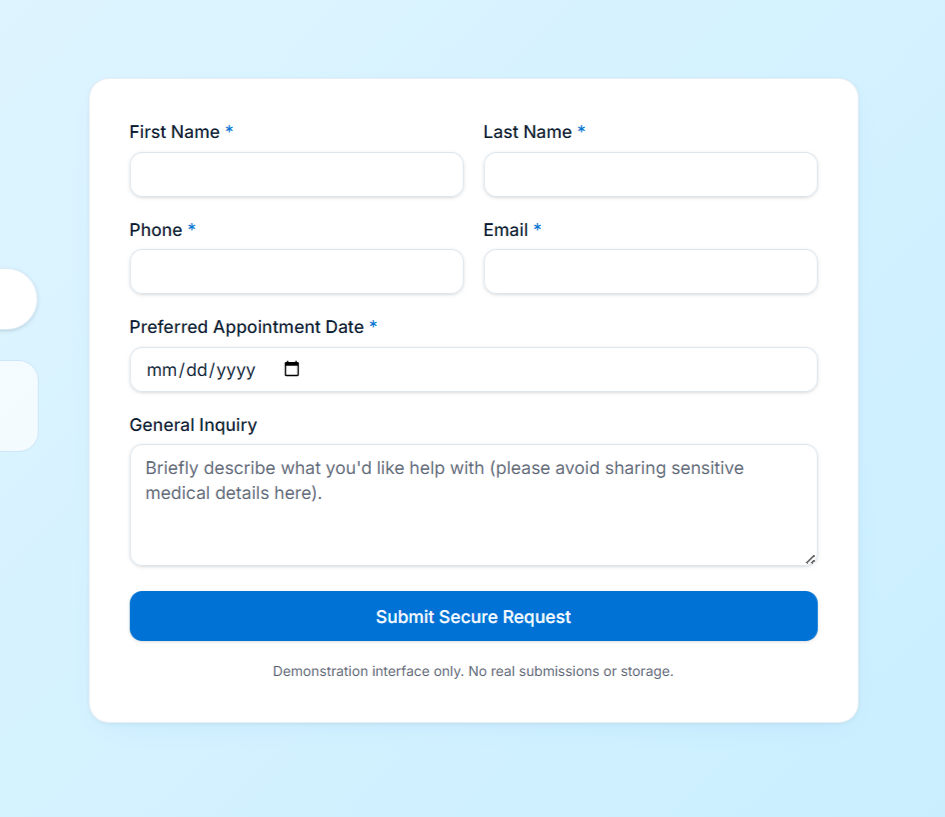
The HIPAA compliant form: minimum necessary data, encrypted submission, privacy acknowledgment, and no PHI routed through email.
HIPAA Compliant Web Form Requirements
To bring your web forms into compliance, every form that could potentially collect PHI must:
- Encrypt data in transit — the form must be served over HTTPS and submit to an encrypted endpoint
- Store data in a HIPAA compliant environment — not your email inbox; a CRM or database hosted by a BAA-signing provider
- Apply the Minimum Necessary Standard — only collect the PHI fields that are absolutely required for the purpose of the form
- Display a clear privacy acknowledgment — a checkbox or inline notice linking to your NPP before submission
- Avoid tracking pixels on confirmation pages — your Facebook Pixel or Google Ads conversion tag should never fire on a form-submitted or thank-you page if any PHI was collected
- Log form submissions — maintain an audit trail of who submitted what and when, for breach investigation purposes
HIPAA Compliant Privacy Policy: What Yours Is Probably Missing
The difference between a generic website privacy policy and a HIPAA compliant one is enormous. Most practices either don't have a policy at all, copy one from a non-healthcare template, or combine their website privacy policy and their HIPAA Notice of Privacy Practices into one confusing document — which satisfies neither requirement properly.
Under HIPAA, covered entities must provide patients with a Notice of Privacy Practices (NPP) — this is a specific document mandated by the Privacy Rule. It is distinct from a general website privacy policy (which governs how your website collects cookies, analytics data, and contact information). Healthcare websites need both — and they are not interchangeable.

Left: A generic website privacy policy with no HIPAA relevance. Right: A fully compliant policy with HIPAA Notice of Privacy Practices integrated.
Key Sections Your NPP Must Include
Per 45 CFR §164.520, a HIPAA Notice of Privacy Practices must include all of the following:
- Header stating: "THIS NOTICE DESCRIBES HOW MEDICAL INFORMATION ABOUT YOU MAY BE USED AND DISCLOSED…"
- Description of how you may use or disclose PHI (treatment, payment, healthcare operations)
- Description of uses and disclosures that require patient authorization
- A list of patient rights (access, amendment, accounting of disclosures, restrictions, confidential communications)
- Your practice's duties to protect PHI and notify patients of breaches
- Name and contact information for your Privacy Officer or complaint contact
- Effective date of the notice
HIPAA Compliant Hosting and Infrastructure
Your website hosting provider is one of the most overlooked vectors of HIPAA risk. If your website collects and stores any PHI — even temporarily — your hosting environment becomes a HIPAA-regulated system. This means your hosting provider must sign a Business Associate Agreement (BAA) with your practice. Without one, you are in violation regardless of every other security measure you have in place.
What Is a Business Associate Agreement (BAA)?
A BAA is a legally binding contract between a covered entity (your practice) and any vendor that handles PHI on your behalf. It commits the vendor to protecting that PHI according to HIPAA standards, outlining what they can do with the data, how they'll report breaches, and what their security obligations are. If a vendor won't sign a BAA, you legally cannot send them any PHI — meaning you cannot use them for your website hosting, form handling, CRM, or email if those systems will touch patient data.
HIPAA Compliant Hosting Requirements
A HIPAA compliant hosting environment must provide:
All stored data — database files, uploaded documents, backup files — must be encrypted at rest using AES-256 or equivalent.
TLS 1.2 or 1.3 must be enforced on all connections. HTTPS must be required site-wide with HSTS headers configured.
Role-based access control with unique user IDs. No shared passwords. MFA required for server and admin access.
All access to systems containing PHI must be logged with timestamps, user IDs, and actions taken. Logs must be retained per your data retention policy.
Regular encrypted backups of all PHI with documented retention and disaster recovery procedures.
The hosting provider must offer and execute a HIPAA Business Associate Agreement. This is non-negotiable — no BAA, no go.
Hosting Providers That Offer HIPAA Compliant Plans
The following providers offer HIPAA compliant hosting tiers and will sign BAAs (always verify current terms directly, as offerings change):
- Amazon Web Services (AWS) — BAA available, dedicated HIPAA eligible services
- Microsoft Azure — BAA available, healthcare compliance blueprints
- Google Cloud Platform — BAA available, HIPAA compliant services listed explicitly
- Liquid Web — Managed HIPAA hosting with BAA for healthcare clients
- Nexcess / Liquid Web's managed WordPress — HIPAA options available on managed plans
- WP Engine — HIPAA compliant WordPress hosting tier with BAA
- Kinsta — HIPAA compliant plans available with signed BAA on business plans
HIPAA Compliant CRM: Managing Patient Data the Right Way
Once a patient submits a form on your website, where does that data go? For most medical practices, the honest answer is "to our email inbox" or "to a spreadsheet." Both are HIPAA violations if PHI is involved. A HIPAA compliant CRM is not optional for practices that collect any patient inquiries online — it's a fundamental requirement.
A HIPAA compliant CRM does far more than just store contact information. It creates a secure, auditable, access-controlled environment for managing the entire patient relationship — from first website inquiry through ongoing communications and appointment tracking. When your CRM operates correctly, every interaction is logged, every access is recorded, and every piece of data is encrypted.

A HIPAA compliant CRM: encrypted patient records, full audit logging, role-based access controls, and complete communication history.
What a HIPAA Compliant CRM Must Include
Every record view, edit, and deletion must be timestamped and user-attributed
Staff see only what their role requires — not the full patient database
All patient communications logged and stored in encrypted records within the CRM
All PHI stored with AES-256 encryption; no plaintext patient records
Documented procedures for securely deleting PHI after retention periods expire
CRM vendor must sign a Business Associate Agreement before any PHI is stored

CRM audit log: every patient record access is automatically logged with user ID, timestamp, and action — a mandatory component of HIPAA Security Rule compliance.
Is WordPress HIPAA Compliant?
WordPress powers approximately 43% of all websites on the internet — and a substantial portion of those are healthcare practices. So the question "is WordPress HIPAA compliant?" is one of the most critical questions in healthcare web development.
The direct answer: WordPress itself is not HIPAA compliant by default. However, a WordPress website can absolutely be made HIPAA compliant with the right combination of hosting, plugins, configurations, and workflows. The CMS itself does not create or prevent compliance — your infrastructure and implementation do.
How to Make Your WordPress Website HIPAA Compliant
Move to HIPAA Compliant WordPress Hosting
Migrate your site to a host that will sign a BAA. WP Engine, Kinsta, and Liquid Web all offer managed WordPress hosting with HIPAA compliance options. This single step addresses encryption at rest, encryption in transit, physical security, and gives you the legal protection of a signed BAA.
Replace Standard Forms with HIPAA Compliant Alternatives
Remove Contact Form 7, WPForms standard tier, and any other forms that send submissions to email. Replace with HIPAA compliant form solutions such as Formstack (BAA available), Jotform HIPAA tier (BAA available), or a direct integration to your HIPAA compliant CRM. Alternatively, use a custom form that posts directly to a secured, encrypted, BAA-protected endpoint.
Audit and Remove Non-Compliant Plugins
Many popular WordPress plugins send data to third-party servers with no HIPAA protections. Common offenders include standard chat widgets, standard analytics integrations (GA4 without de-identification), Jetpack (shares data with WordPress.com servers), and many SEO plugins that log user behavior. Each plugin that touches PHI data must have a signed BAA.
Implement Access Control and User Management
Use a plugin like User Role Editor to restrict CMS access to minimum necessary roles. Enable two-factor authentication for all admin and editor accounts. Create unique login credentials for every user — never share admin passwords. Revoke access immediately when a staff member leaves.
Install Audit Logging
Install a WordPress audit log plugin such as WP Activity Log to record every login, every content change, every plugin activation, and every settings modification — with timestamps and user IDs. This log must be stored securely, protected from modification, and retained according to your data retention policy.
Configure HTTPS, HSTS, and Security Headers
Ensure SSL is active and enforced. Configure HSTS (HTTP Strict Transport Security) headers to prevent any non-HTTPS connections. Add security headers including X-Content-Type-Options, X-Frame-Options, and Content Security Policy to reduce attack vectors against your website's patient data.
Best HIPAA Compliant Website Builders: An Honest Comparison
Searching for the "best HIPAA compliant website builder" returns a lot of marketing claims and very little useful comparison. The reality is that no off-the-shelf website builder makes you automatically HIPAA compliant — compliance requires the right combination of platform, hosting, form handling, and process. That said, some builders make compliance significantly easier than others.
| Platform | BAA Available? | HIPAA Forms | Encrypted Hosting | Best For |
|---|---|---|---|---|
| WordPress + HIPAA Host | Yes (via host) | Plugin required | Yes | Full customization, large practices |
| Wix Health | Yes | Built-in | Yes | Small-medium practices, quick setup |
| Squarespace + Jotform | Partial (Jotform) | Via Jotform | Yes (transit only) | Design-focused small practices |
| Webflow | No native BAA | Not native | Yes | Design agencies; needs external tools |
| Kareo / DrChrono Sites | Yes | Built-in | Yes | EHR-integrated practice sites |
| Shopify / BigCommerce | No | Not applicable | E-commerce only | Not suitable for PHI-collecting health sites |
Not Sure Which Platform Is Right for Your Practice?
Our healthcare web development specialists will evaluate your current setup, patient volume, and budget — and recommend the right compliant architecture. No obligation.
Schedule a Free Strategy CallThe Complete HIPAA Website Self-Audit Checklist
Use this checklist to audit your own website right now. Work through each item — if you check anything as "No" or "Not Sure," that's an action item requiring immediate attention. We recommend working through this checklist quarterly and documenting your results as part of your HIPAA compliance program.
HIPAA Website Compliance Audit Checklist
Check each item that applies to your website. Use results to prioritize your remediation roadmap.
Your website loads on HTTPS and your SSL certificate is current, properly installed, and not expired. Verify at ssl.com or Google Search Console — a browser padlock is not always sufficient confirmation.
CriticalAll HTTP URLs automatically redirect to HTTPS — including every page, image, script, and asset. No mixed-content warnings appear in browser developer tools.
CriticalAll databases and storage systems containing any PHI collected by your website are encrypted at rest using AES-256 or equivalent encryption standard. Confirm with your hosting provider directly and get written confirmation.
CriticalOlder, insecure protocols (SSL 3.0, TLS 1.0, TLS 1.1) are disabled on your server. Only TLS 1.2 and 1.3 are accepted. Test using Qualys SSL Labs for a free report.
CriticalYour website is hosted on a platform that explicitly offers HIPAA compliant infrastructure — not shared budget hosting. Verify that HIPAA compliance is listed in your plan tier.
CriticalYou have a fully executed BAA signed by your hosting provider, stored securely and accessible for audit purposes. This document must predate any PHI being stored on their servers.
CriticalEvery vendor whose tool touches PHI on your website — form providers, CRM platforms, email marketing tools, scheduling software, chat widgets, live answering services — has signed a BAA with your practice. This is a common area where practices have 1–2 BAAs but miss 4–5 vendors.
CriticalEvery staff member who accesses your website backend, CRM, or patient data systems has a unique login with access limited to only what their role requires. No shared passwords. Access to PHI is restricted to authorized individuals only.
RequiredTwo-factor or multi-factor authentication is enabled for all administrators, editors, and anyone with access to systems containing PHI. Password-only access to healthcare data systems is not HIPAA compliant.
RequiredYou have a documented and followed procedure for immediately revoking all system access when a staff member leaves — within the same business day. Include CRM access, website backend, email accounts, scheduling tools, and any other system holding PHI.
RequiredEvery login, data access, record modification, and deletion within your website backend, CRM, and patient data systems is automatically logged with timestamps and user IDs. Logs are stored in a tamper-evident location.
RequiredAudit logs are actively reviewed — not just collected — on a defined schedule (weekly or monthly). Anomalous access patterns are investigated. Someone in your organization is designated as responsible for this review.
RequiredContact forms, appointment request forms, consultation inquiry forms, and any other forms on your website that could collect PHI are handled by a HIPAA compliant form provider (one with a signed BAA) — not standard Contact Form 7, generic Wix/Squarespace forms, or basic WPForms.
CriticalYour forms collect only the minimum information necessary for their stated purpose. No open-ended "describe your condition" fields, no SSN collection on website forms, no unnecessary health history fields on initial inquiry forms.
RequiredYour Facebook Pixel, Google Ads Conversion Tag, TikTok Pixel, and any other advertising or analytics tags do NOT fire on form confirmation pages or "thank you" pages where any PHI was involved in the preceding form submission.
CriticalAll PHI collected by your website — form submissions, patient records in your CRM, uploaded documents — is backed up automatically on a regular schedule (minimum weekly, ideally daily). All backups are encrypted with the same or stronger standard as the primary data.
RequiredYour practice has written, tested procedures for restoring PHI from backups in the event of a system failure, ransomware attack, or accidental deletion. You also have documented procedures for securely and permanently deleting PHI at the end of its retention period, in compliance with state law and HIPAA requirements.
RequiredYour website displays a full, HIPAA-compliant Notice of Privacy Practices that meets all requirements of 45 CFR §164.520 — including patient rights, permitted uses and disclosures, breach notification policy, effective date, and your Privacy Officer's contact information.
CriticalEvery form that could collect PHI includes a clear reference to and link to your Notice of Privacy Practices — either as a checkbox acknowledgment or inline notice — before the patient submits their information.
RequiredEvery patient testimonial, case study, before/after photo, or success story published on your website was obtained with documented, written patient authorization that specifies how their information or image will be used. General consent forms do not cover testimonial use — authorization must be specific and separate.
RequiredYour HIPAA compliance documentation includes written policies and procedures specifically addressing how your website collects, stores, transmits, accesses, retains, and deletes PHI — who is responsible, how incidents are reported, and how training is conducted for staff who manage website data.
RecommendedFrequently Asked Questions
What makes a website HIPAA compliant?
Does my medical practice website need to be HIPAA compliant if I don't have a patient portal?
Is WordPress HIPAA compliant?
What is the best HIPAA compliant website builder for a small medical practice?
Can I use Google Analytics on my medical website?
What is a Business Associate Agreement and why does my website need one?
Do I need a HIPAA compliant website if I only have a blog and a phone number?
Your Website Is Part of Your HIPAA Program — Treat It That Way
HIPAA compliance has never been a "set it and forget it" undertaking — and your website is no exception. In 2026, with growing OCR enforcement activity, increasing patient privacy awareness, and the expanding attack surface created by third-party trackers and marketing tools, your website's compliance posture deserves the same rigorous attention you give to your in-office policies and EHR security.
The practices we work with at ImpactBrains who have been through HIPAA audits — or worse, breach investigations — all say the same thing in retrospect: the cost of getting it right from the start is a fraction of the cost of remediation, fines, and reputational damage after a violation. A HIPAA compliant website is not a burden on your practice — it's a competitive differentiator that shows patients you take their privacy as seriously as their health.
Use the checklist in this guide to assess where you stand today. Use the comparison examples to see what compliant design actually looks like in practice. And if you'd like expert help building or auditing your healthcare website, ImpactBrains has helped dozens of medical practices achieve full HIPAA compliance without sacrificing design quality or conversion performance.
What Makes a Website HIPAA Compliant?
The Health Insurance Portability and Accountability Act (HIPAA) was signed into law in 1996, but its implications for modern websites are vast — and vastly misunderstood. When most healthcare providers think of HIPAA, they think of patient intake paperwork and medical records. What they don't always realize is that their website is also a point of data collection — and in many cases, a point of serious HIPAA risk.
A HIPAA compliant website is one that meets all applicable requirements under HIPAA's Privacy Rule, Security Rule, and Breach Notification Rule when it comes to the collection, storage, transmission, and management of Protected Health Information (PHI). PHI is any information that can be used to identify a patient and relates to their health condition, healthcare services received, or payment for those services.
HIPAA compliance for websites is governed primarily by two rules:
The Security Rule
Governs how electronic PHI (ePHI) must be protected — including data encryption during transmission and at rest, access controls, audit trails, and technical safeguards. This is the rule most directly relevant to your website's technical architecture.
The Privacy Rule
Dictates what PHI can be used or disclosed, who it can be shared with, and what disclosures must be logged. It requires your website to display a Notice of Privacy Practices and governs consent around testimonials and patient communications.
Together, these rules create a comprehensive framework for how your website should be built, hosted, and managed — from the web forms you use to the third-party tools you install (like analytics platforms and chatbots).
The 7 Core Elements of a HIPAA Compliant Website
Breaking it down to its fundamentals, a truly HIPAA compliant website requires all of the following:
Does Your Medical Website Actually Need to Be HIPAA Compliant?
The short answer: if your website interacts with patients in any way — yes, it almost certainly does. But let's get specific, because the nuance matters enormously.
HIPAA compliance applies to Covered Entities and their Business Associates. A Covered Entity is any healthcare provider, health plan, or healthcare clearinghouse that transmits health information electronically. This includes:
- Medical and dental practices of all sizes
- Hospitals and outpatient clinics
- Mental health and behavioral health providers
- Chiropractors, physical therapists, and occupational therapists
- Pharmacies and pharmacists
- Home health agencies
- Medical billing companies
- Health insurance companies and their brokers
Even a wellness blog or a practice brochure website can inadvertently collect PHI through its contact forms. The critical question isn't what type of site you have — it's whether your site can receive any information that links a person to a health-related matter.
HIPAA Penalties Are Not Hypothetical
The Office for Civil Rights (OCR) within the U.S. Department of Health and Human Services actively investigates HIPAA violations. Civil penalties are tiered by culpability:
| Violation Category | Minimum Fine | Maximum Per Year | Example |
|---|---|---|---|
| Unknown / No Reasonable Cause | $100 per violation | $25,000 | Unencrypted form on your website |
| Reasonable Cause, Not Willful Neglect | $1,000 per violation | $100,000 | No BAA with your website hosting provider |
| Willful Neglect, Corrected | $10,000 per violation | $250,000 | Known vulnerability left unaddressed |
| Willful Neglect, Not Corrected | $50,000 per violation | $1,900,000 | Repeated breaches after documented warning |
Source: U.S. Department of Health and Human Services, Civil Money Penalties (2024 adjusted amounts)
Real Example: Bad vs. Good HIPAA Landing Page Design
Most HIPAA violations on healthcare websites aren't the result of malicious intent — they happen because whoever built the site didn't know what "HIPAA compliant website design" actually means in practice. Below, we break down two real landing pages side by side: one built without HIPAA in mind, and one designed with full compliance from the ground up.
Watch: How to make your website HIPAA compliant — a 10-minute walkthrough comparing a non-compliant and compliant medical landing page
Left: A medical landing page with multiple HIPAA violations (red annotations). Right: The same practice's compliant redesign following HIPAA best practices.
Want Us to Audit Your Website for Free?
ImpactBrains specializes in HIPAA compliant website design for medical practices. We'll identify every compliance gap and send you a detailed report — at no cost.
Get My Free HIPAA AuditThe #1 HIPAA Violation on Medical Websites: Web Forms
If you ask any HIPAA compliance expert what single website element they see violated most often on healthcare websites, the answer is almost always the same: the contact form. Specifically, HIPAA compliant web forms are the single most misunderstood element of healthcare website compliance.
The root of the problem is how standard web forms work. When a visitor fills out a typical WordPress contact form or Wix contact widget and clicks "Submit," that data is transmitted over the internet and typically delivered to the practice's email inbox. If that email is not HIPAA compliant — meaning the email provider hasn't signed a BAA — you have just transmitted PHI through an unsecured channel. Every single submission. Every single day.
What Fields Are Considered PHI on a Web Form?
Not all form fields create a PHI problem. The issue arises when you combine an identifier (like a name or phone number) with any health-related information. Here's a practical breakdown:
The non-compliant form: collecting excessive PHI, no encryption, no privacy notice, and data routed through standard email.
The HIPAA compliant form: minimum necessary data, encrypted submission, privacy acknowledgment, and no PHI routed through email.
HIPAA Compliant Web Form Requirements
To bring your web forms into compliance, every form that could potentially collect PHI must:
- Encrypt data in transit — the form must be served over HTTPS and submit to an encrypted endpoint
- Store data in a HIPAA compliant environment — not your email inbox; a CRM or database hosted by a BAA-signing provider
- Apply the Minimum Necessary Standard — only collect the PHI fields that are absolutely required for the purpose of the form
- Display a clear privacy acknowledgment — a checkbox or inline notice linking to your NPP before submission
- Avoid tracking pixels on confirmation pages — your Facebook Pixel or Google Ads conversion tag should never fire on a form-submitted or thank-you page if any PHI was collected
- Log form submissions — maintain an audit trail of who submitted what and when, for breach investigation purposes
HIPAA Compliant Privacy Policy: What Yours Is Probably Missing
The difference between a generic website privacy policy and a HIPAA compliant one is enormous. Most practices either don't have a policy at all, copy one from a non-healthcare template, or combine their website privacy policy and their HIPAA Notice of Privacy Practices into one confusing document — which satisfies neither requirement properly.
Under HIPAA, covered entities must provide patients with a Notice of Privacy Practices (NPP) — this is a specific document mandated by the Privacy Rule. It is distinct from a general website privacy policy (which governs how your website collects cookies, analytics data, and contact information). Healthcare websites need both — and they are not interchangeable.
Left: A generic website privacy policy with no HIPAA relevance. Right: A fully compliant policy with HIPAA Notice of Privacy Practices integrated.
Key Sections Your NPP Must Include
Per 45 CFR §164.520, a HIPAA Notice of Privacy Practices must include all of the following:
- Header stating: "THIS NOTICE DESCRIBES HOW MEDICAL INFORMATION ABOUT YOU MAY BE USED AND DISCLOSED…"
- Description of how you may use or disclose PHI (treatment, payment, healthcare operations)
- Description of uses and disclosures that require patient authorization
- A list of patient rights (access, amendment, accounting of disclosures, restrictions, confidential communications)
- Your practice's duties to protect PHI and notify patients of breaches
- Name and contact information for your Privacy Officer or complaint contact
- Effective date of the notice
HIPAA Compliant Hosting and Infrastructure
Your website hosting provider is one of the most overlooked vectors of HIPAA risk. If your website collects and stores any PHI — even temporarily — your hosting environment becomes a HIPAA-regulated system. This means your hosting provider must sign a Business Associate Agreement (BAA) with your practice. Without one, you are in violation regardless of every other security measure you have in place.
What Is a Business Associate Agreement (BAA)?
A BAA is a legally binding contract between a covered entity (your practice) and any vendor that handles PHI on your behalf. It commits the vendor to protecting that PHI according to HIPAA standards, outlining what they can do with the data, how they'll report breaches, and what their security obligations are. If a vendor won't sign a BAA, you legally cannot send them any PHI — meaning you cannot use them for your website hosting, form handling, CRM, or email if those systems will touch patient data.
HIPAA Compliant Hosting Requirements
A HIPAA compliant hosting environment must provide:
All stored data — database files, uploaded documents, backup files — must be encrypted at rest using AES-256 or equivalent.
TLS 1.2 or 1.3 must be enforced on all connections. HTTPS must be required site-wide with HSTS headers configured.
Role-based access control with unique user IDs. No shared passwords. MFA required for server and admin access.
All access to systems containing PHI must be logged with timestamps, user IDs, and actions taken. Logs must be retained per your data retention policy.
Regular encrypted backups of all PHI with documented retention and disaster recovery procedures.
The hosting provider must offer and execute a HIPAA Business Associate Agreement. This is non-negotiable — no BAA, no go.
Hosting Providers That Offer HIPAA Compliant Plans
The following providers offer HIPAA compliant hosting tiers and will sign BAAs (always verify current terms directly, as offerings change):
- Amazon Web Services (AWS) — BAA available, dedicated HIPAA eligible services
- Microsoft Azure — BAA available, healthcare compliance blueprints
- Google Cloud Platform — BAA available, HIPAA compliant services listed explicitly
- Liquid Web — Managed HIPAA hosting with BAA for healthcare clients
- Nexcess / Liquid Web's managed WordPress — HIPAA options available on managed plans
- WP Engine — HIPAA compliant WordPress hosting tier with BAA
- Kinsta — HIPAA compliant plans available with signed BAA on business plans
HIPAA Compliant CRM: Managing Patient Data the Right Way
Once a patient submits a form on your website, where does that data go? For most medical practices, the honest answer is "to our email inbox" or "to a spreadsheet." Both are HIPAA violations if PHI is involved. A HIPAA compliant CRM is not optional for practices that collect any patient inquiries online — it's a fundamental requirement.
A HIPAA compliant CRM does far more than just store contact information. It creates a secure, auditable, access-controlled environment for managing the entire patient relationship — from first website inquiry through ongoing communications and appointment tracking. When your CRM operates correctly, every interaction is logged, every access is recorded, and every piece of data is encrypted.
A HIPAA compliant CRM: encrypted patient records, full audit logging, role-based access controls, and complete communication history.
What a HIPAA Compliant CRM Must Include
Every record view, edit, and deletion must be timestamped and user-attributed
Staff see only what their role requires — not the full patient database
All patient communications logged and stored in encrypted records within the CRM
All PHI stored with AES-256 encryption; no plaintext patient records
Documented procedures for securely deleting PHI after retention periods expire
CRM vendor must sign a Business Associate Agreement before any PHI is stored
CRM audit log: every patient record access is automatically logged with user ID, timestamp, and action — a mandatory component of HIPAA Security Rule compliance.
Is WordPress HIPAA Compliant?
WordPress powers approximately 43% of all websites on the internet — and a substantial portion of those are healthcare practices. So the question "is WordPress HIPAA compliant?" is one of the most critical questions in healthcare web development.
The direct answer: WordPress itself is not HIPAA compliant by default. However, a WordPress website can absolutely be made HIPAA compliant with the right combination of hosting, plugins, configurations, and workflows. The CMS itself does not create or prevent compliance — your infrastructure and implementation do.
How to Make Your WordPress Website HIPAA Compliant
Move to HIPAA Compliant WordPress Hosting
Migrate your site to a host that will sign a BAA. WP Engine, Kinsta, and Liquid Web all offer managed WordPress hosting with HIPAA compliance options. This single step addresses encryption at rest, encryption in transit, physical security, and gives you the legal protection of a signed BAA.
Replace Standard Forms with HIPAA Compliant Alternatives
Remove Contact Form 7, WPForms standard tier, and any other forms that send submissions to email. Replace with HIPAA compliant form solutions such as Formstack (BAA available), Jotform HIPAA tier (BAA available), or a direct integration to your HIPAA compliant CRM. Alternatively, use a custom form that posts directly to a secured, encrypted, BAA-protected endpoint.
Audit and Remove Non-Compliant Plugins
Many popular WordPress plugins send data to third-party servers with no HIPAA protections. Common offenders include standard chat widgets, standard analytics integrations (GA4 without de-identification), Jetpack (shares data with WordPress.com servers), and many SEO plugins that log user behavior. Each plugin that touches PHI data must have a signed BAA.
Implement Access Control and User Management
Use a plugin like User Role Editor to restrict CMS access to minimum necessary roles. Enable two-factor authentication for all admin and editor accounts. Create unique login credentials for every user — never share admin passwords. Revoke access immediately when a staff member leaves.
Install Audit Logging
Install a WordPress audit log plugin such as WP Activity Log to record every login, every content change, every plugin activation, and every settings modification — with timestamps and user IDs. This log must be stored securely, protected from modification, and retained according to your data retention policy.
Configure HTTPS, HSTS, and Security Headers
Ensure SSL is active and enforced. Configure HSTS (HTTP Strict Transport Security) headers to prevent any non-HTTPS connections. Add security headers including X-Content-Type-Options, X-Frame-Options, and Content Security Policy to reduce attack vectors against your website's patient data.
Best HIPAA Compliant Website Builders: An Honest Comparison
Searching for the "best HIPAA compliant website builder" returns a lot of marketing claims and very little useful comparison. The reality is that no off-the-shelf website builder makes you automatically HIPAA compliant — compliance requires the right combination of platform, hosting, form handling, and process. That said, some builders make compliance significantly easier than others.
| Platform | BAA Available? | HIPAA Forms | Encrypted Hosting | Best For |
|---|---|---|---|---|
| WordPress + HIPAA Host | Yes (via host) | Plugin required | Yes | Full customization, large practices |
| Wix Health | Yes | Built-in | Yes | Small-medium practices, quick setup |
| Squarespace + Jotform | Partial (Jotform) | Via Jotform | Yes (transit only) | Design-focused small practices |
| Webflow | No native BAA | Not native | Yes | Design agencies; needs external tools |
| Kareo / DrChrono Sites | Yes | Built-in | Yes | EHR-integrated practice sites |
| Shopify / BigCommerce | No | Not applicable | E-commerce only | Not suitable for PHI-collecting health sites |
Not Sure Which Platform Is Right for Your Practice?
Our healthcare web development specialists will evaluate your current setup, patient volume, and budget — and recommend the right compliant architecture. No obligation.
Schedule a Free Strategy CallThe Complete HIPAA Website Self-Audit Checklist
Use this checklist to audit your own website right now. Work through each item — if you check anything as "No" or "Not Sure," that's an action item requiring immediate attention. We recommend working through this checklist quarterly and documenting your results as part of your HIPAA compliance program.
HIPAA Website Compliance Audit Checklist
Check each item that applies to your website. Use results to prioritize your remediation roadmap.
Your website loads on HTTPS and your SSL certificate is current, properly installed, and not expired. Verify at ssl.com or Google Search Console — a browser padlock is not always sufficient confirmation.
CriticalAll HTTP URLs automatically redirect to HTTPS — including every page, image, script, and asset. No mixed-content warnings appear in browser developer tools.
CriticalAll databases and storage systems containing any PHI collected by your website are encrypted at rest using AES-256 or equivalent encryption standard. Confirm with your hosting provider directly and get written confirmation.
CriticalOlder, insecure protocols (SSL 3.0, TLS 1.0, TLS 1.1) are disabled on your server. Only TLS 1.2 and 1.3 are accepted. Test using Qualys SSL Labs for a free report.
CriticalYour website is hosted on a platform that explicitly offers HIPAA compliant infrastructure — not shared budget hosting. Verify that HIPAA compliance is listed in your plan tier.
CriticalYou have a fully executed BAA signed by your hosting provider, stored securely and accessible for audit purposes. This document must predate any PHI being stored on their servers.
CriticalEvery vendor whose tool touches PHI on your website — form providers, CRM platforms, email marketing tools, scheduling software, chat widgets, live answering services — has signed a BAA with your practice. This is a common area where practices have 1–2 BAAs but miss 4–5 vendors.
CriticalEvery staff member who accesses your website backend, CRM, or patient data systems has a unique login with access limited to only what their role requires. No shared passwords. Access to PHI is restricted to authorized individuals only.
RequiredTwo-factor or multi-factor authentication is enabled for all administrators, editors, and anyone with access to systems containing PHI. Password-only access to healthcare data systems is not HIPAA compliant.
RequiredYou have a documented and followed procedure for immediately revoking all system access when a staff member leaves — within the same business day. Include CRM access, website backend, email accounts, scheduling tools, and any other system holding PHI.
RequiredEvery login, data access, record modification, and deletion within your website backend, CRM, and patient data systems is automatically logged with timestamps and user IDs. Logs are stored in a tamper-evident location.
RequiredAudit logs are actively reviewed — not just collected — on a defined schedule (weekly or monthly). Anomalous access patterns are investigated. Someone in your organization is designated as responsible for this review.
RequiredContact forms, appointment request forms, consultation inquiry forms, and any other forms on your website that could collect PHI are handled by a HIPAA compliant form provider (one with a signed BAA) — not standard Contact Form 7, generic Wix/Squarespace forms, or basic WPForms.
CriticalYour forms collect only the minimum information necessary for their stated purpose. No open-ended "describe your condition" fields, no SSN collection on website forms, no unnecessary health history fields on initial inquiry forms.
RequiredYour Facebook Pixel, Google Ads Conversion Tag, TikTok Pixel, and any other advertising or analytics tags do NOT fire on form confirmation pages or "thank you" pages where any PHI was involved in the preceding form submission.
CriticalAll PHI collected by your website — form submissions, patient records in your CRM, uploaded documents — is backed up automatically on a regular schedule (minimum weekly, ideally daily). All backups are encrypted with the same or stronger standard as the primary data.
RequiredYour practice has written, tested procedures for restoring PHI from backups in the event of a system failure, ransomware attack, or accidental deletion. You also have documented procedures for securely and permanently deleting PHI at the end of its retention period, in compliance with state law and HIPAA requirements.
RequiredYour website displays a full, HIPAA-compliant Notice of Privacy Practices that meets all requirements of 45 CFR §164.520 — including patient rights, permitted uses and disclosures, breach notification policy, effective date, and your Privacy Officer's contact information.
CriticalEvery form that could collect PHI includes a clear reference to and link to your Notice of Privacy Practices — either as a checkbox acknowledgment or inline notice — before the patient submits their information.
RequiredEvery patient testimonial, case study, before/after photo, or success story published on your website was obtained with documented, written patient authorization that specifies how their information or image will be used. General consent forms do not cover testimonial use — authorization must be specific and separate.
RequiredYour HIPAA compliance documentation includes written policies and procedures specifically addressing how your website collects, stores, transmits, accesses, retains, and deletes PHI — who is responsible, how incidents are reported, and how training is conducted for staff who manage website data.
RecommendedFrequently Asked Questions
What makes a website HIPAA compliant?
Does my medical practice website need to be HIPAA compliant if I don't have a patient portal?
Is WordPress HIPAA compliant?
What is the best HIPAA compliant website builder for a small medical practice?
Can I use Google Analytics on my medical website?
What is a Business Associate Agreement and why does my website need one?
Do I need a HIPAA compliant website if I only have a blog and a phone number?
Your Website Is Part of Your HIPAA Program — Treat It That Way
HIPAA compliance has never been a "set it and forget it" undertaking — and your website is no exception. In 2026, with growing OCR enforcement activity, increasing patient privacy awareness, and the expanding attack surface created by third-party trackers and marketing tools, your website's compliance posture deserves the same rigorous attention you give to your in-office policies and EHR security.
The practices we work with at ImpactBrains who have been through HIPAA audits — or worse, breach investigations — all say the same thing in retrospect: the cost of getting it right from the start is a fraction of the cost of remediation, fines, and reputational damage after a violation. A HIPAA compliant website is not a burden on your practice — it's a competitive differentiator that shows patients you take their privacy as seriously as their health.
Use the checklist in this guide to assess where you stand today. Use the comparison examples to see what compliant design actually looks like in practice. And if you'd like expert help building or auditing your healthcare website, ImpactBrains has helped dozens of medical practices achieve full HIPAA compliance without sacrificing design quality or conversion performance.