Why Your Medical Practice Isn't Showing Up on Google Maps (And How to Fix It)
If you can't find your practice on Maps, neither can patients. Here are the 11 reasons your Google Business Profile is invisible — and the exact fix for each.
Not sure why you're invisible?
We'll run a free 30-min Maps diagnostic on your practice and tell you exactly what's broken.
How Google decides who shows on Maps
Google's Local Pack — the 3 results that appear above organic listings on a local search — is decided by three signals: relevance, distance, and prominence. Miss any one of them and you vanish from the map. For medical practices, relevance is where most clinics fail because they pick the wrong primary category. Distance is largely fixed. Prominence is built over months through reviews, citations, and authority.

For 80% of underperforming practices, the fastest win isn't more reviews — it's fixing the primary category and adding 5–7 missing secondary categories.
Profile setup mistakes that kill visibility
1. Your primary category is too generic
'Doctor' or 'Medical Clinic' is the worst possible choice. Google can't tell what you actually do. Pick the most specific category that matches your top-revenue service: Dermatologist, Orthodontist, Pediatric Dentist, Med Spa.
2. You skipped secondary categories
You get up to 9 additional categories. Most practices use 0–2. Add every service you offer: Cosmetic Dentist, Emergency Dental Service, Teeth Whitening Service.
3. Services and Products sections are blank
Each service should have a name, description, and price (or "Call for pricing"). Google reads this as a direct relevance signal.
| Element | Broken setup | Fixed setup |
|---|---|---|
| Primary category | Doctor | Dermatologist |
| Secondary categories | 0–1 | 5–9 specific services |
| Services list | Empty | Every service + description |
| Service area | Not set | 15–25 mile radius / city list |
Most practices fail steps 1–3.
If your primary category isn't your highest-revenue service, you're invisible by design. We'll fix it for you.
NAP & citation chaos
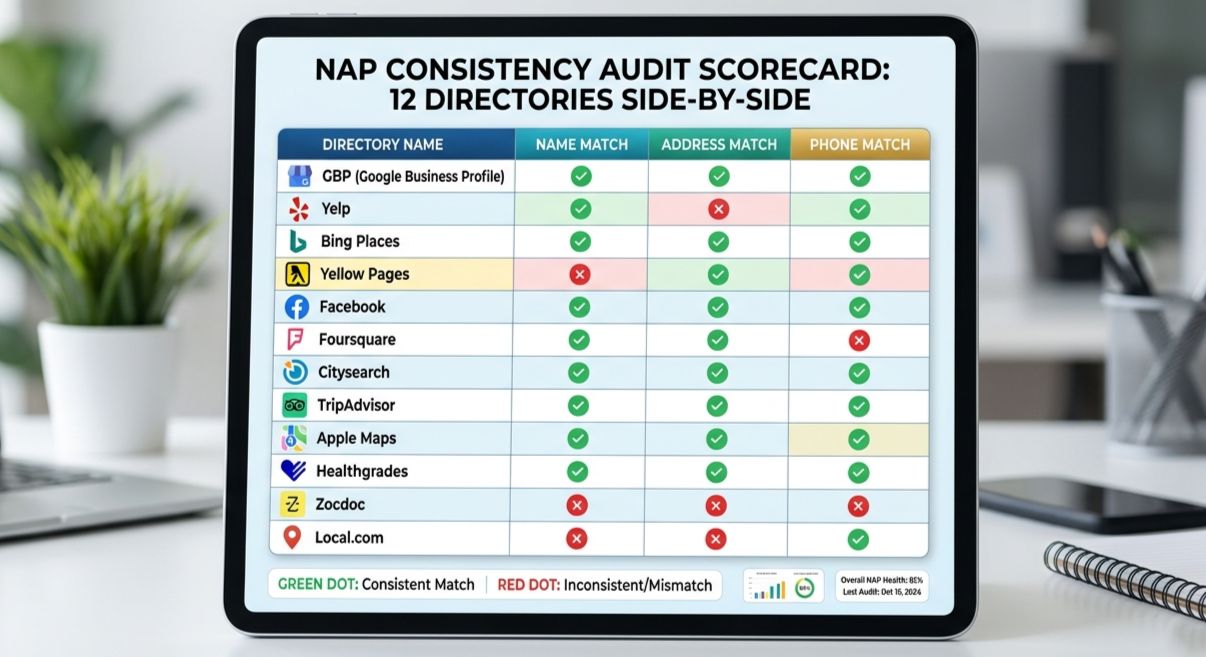
4. Your Name, Address, Phone don't match everywhere
NAP consistency is non-negotiable. "Smith Family Dental" on Google, "Dr. Smith Dental" on Healthgrades, and "Smith Dental Clinic" on your website tells Google these might be three different businesses. Pick one canonical name and update every listing.
5. You're missing core healthcare citations
Healthcare has its own citation graph. You need to be on: Healthgrades, Vitals, Zocdoc, WebMD, RateMDs, your state medical board directory, and 15+ general directories (Yelp, BBB, Yellow Pages).
6. Your phone number tracks differently in different places
Using a call-tracking number on your website but a different number on GBP? Google sees a mismatch. Use one main number everywhere; use call tracking via dynamic number insertion only.
Reviews, photos & posts you're not doing
7. You have fewer than 50 reviews
The median Local Pack winner in healthcare has 80+ reviews. Run a recurring review request flow (we cover that in the patient follow-up system guide).
8. You don't reply to reviews
Reply to every review — positive and negative — within 48 hours. It signals an active, accountable business. Templated replies are fine; silence is not.
9. You have under 20 photos
Aim for 50+. Real photos of: exterior, signage, reception, exam rooms, equipment, and staff. Upload from a phone at the practice so geo-tags strengthen your location signal.
- 20+ exterior photos (different angles, day and night)
- 10+ interior shots (waiting area, exam rooms, equipment)
- 5+ team photos with names and credentials
- 5+ procedure/process shots (where appropriate and HIPAA-safe)
- Weekly GBP post: offer, news, or a tip
Skip the 30-day grind.
We do all 11 fixes in 14 days — GBP, citations, review engine, photos, the full setup.
Book My Free Audit →Suspensions & website signals
10. Your profile was suspended (and you didn't know)
Common triggers: virtual office address, multiple practitioners sharing one listing, keyword stuffing your business name ("Smith Dental — Best Dentist in Phoenix"), or sudden NAP changes.
Do NOT create a new profile. Submit a reinstatement request with proof of business: license, lease, signage photos, utility bill, insurance docs. Expect 3–14 days.
11. Your website isn't reinforcing your location
Your homepage must include your city in the H1, an embedded Google Map, your full NAP in the footer, and structured data (MedicalBusiness or Dentist schema). Without these, Google can't tie your GBP to a trusted website.

Google Maps Visibility Audit
Tick every item that's true for your practice today. Your score updates live.
Score below 70?
We'll walk you through every red flag, explain why it matters, and give you a 30-day plan — free.
Your 30-day fix plan
Here's the order of operations we use on every client. Do it in this sequence — switching the order wastes 1–2 weeks.
Week 1 — Foundation
- Audit and fix primary + secondary categories
- Standardize NAP across GBP, website, and top 5 citations
- Add every service with description and price
- Set realistic service area
Week 2 — Authority
- Submit to 25+ citation sources (healthcare-specific first)
- Upload 40+ photos taken on-location
- Add MedicalBusiness schema to your homepage
- Embed Google Map on contact page
Week 3 — Reviews & Content
- Launch a review-request SMS/email flow (target: 10/week)
- Reply to every existing review
- Publish first GBP post (commit to weekly thereafter)
Week 4 — Measure & Iterate
- Track Maps impressions and direction requests in GBP Insights
- Audit speed on PageSpeed Insights — fix anything below 80
- Internal-link service pages from homepage
Done reading? Let's go fix it.
A free 30-minute audit, a custom 30-day plan, no pitch. Just a clear path to the Local 3-Pack.
Book My Free Audit →Frequently Asked Questions
Quick answers to what practice owners ask us most.
Why Your Medical Practice Isn't Showing Up on Google Maps (And How to Fix It)
If you can't find your practice on Maps, neither can patients. Here are the 11 reasons your Google Business Profile is invisible — and the exact fix for each.
Not sure why you're invisible?
We'll run a free 30-min Maps diagnostic on your practice and tell you exactly what's broken.
How Google decides who shows on Maps
Google's Local Pack — the 3 results that appear above organic listings on a local search — is decided by three signals: relevance, distance, and prominence. Miss any one of them and you vanish from the map. For medical practices, relevance is where most clinics fail because they pick the wrong primary category. Distance is largely fixed. Prominence is built over months through reviews, citations, and authority.
For 80% of underperforming practices, the fastest win isn't more reviews — it's fixing the primary category and adding 5–7 missing secondary categories.
Profile setup mistakes that kill visibility
1. Your primary category is too generic
'Doctor' or 'Medical Clinic' is the worst possible choice. Google can't tell what you actually do. Pick the most specific category that matches your top-revenue service: Dermatologist, Orthodontist, Pediatric Dentist, Med Spa.
2. You skipped secondary categories
You get up to 9 additional categories. Most practices use 0–2. Add every service you offer: Cosmetic Dentist, Emergency Dental Service, Teeth Whitening Service.
3. Services and Products sections are blank
Each service should have a name, description, and price (or "Call for pricing"). Google reads this as a direct relevance signal.
| Element | Broken setup | Fixed setup |
|---|---|---|
| Primary category | Doctor | Dermatologist |
| Secondary categories | 0–1 | 5–9 specific services |
| Services list | Empty | Every service + description |
| Service area | Not set | 15–25 mile radius / city list |
Most practices fail steps 1–3.
If your primary category isn't your highest-revenue service, you're invisible by design. We'll fix it for you.
NAP & citation chaos
4. Your Name, Address, Phone don't match everywhere
NAP consistency is non-negotiable. "Smith Family Dental" on Google, "Dr. Smith Dental" on Healthgrades, and "Smith Dental Clinic" on your website tells Google these might be three different businesses. Pick one canonical name and update every listing.
5. You're missing core healthcare citations
Healthcare has its own citation graph. You need to be on: Healthgrades, Vitals, Zocdoc, WebMD, RateMDs, your state medical board directory, and 15+ general directories (Yelp, BBB, Yellow Pages).
6. Your phone number tracks differently in different places
Using a call-tracking number on your website but a different number on GBP? Google sees a mismatch. Use one main number everywhere; use call tracking via dynamic number insertion only.
Reviews, photos & posts you're not doing
7. You have fewer than 50 reviews
The median Local Pack winner in healthcare has 80+ reviews. Run a recurring review request flow (we cover that in the patient follow-up system guide).
8. You don't reply to reviews
Reply to every review — positive and negative — within 48 hours. It signals an active, accountable business. Templated replies are fine; silence is not.
9. You have under 20 photos
Aim for 50+. Real photos of: exterior, signage, reception, exam rooms, equipment, and staff. Upload from a phone at the practice so geo-tags strengthen your location signal.
- 20+ exterior photos (different angles, day and night)
- 10+ interior shots (waiting area, exam rooms, equipment)
- 5+ team photos with names and credentials
- 5+ procedure/process shots (where appropriate and HIPAA-safe)
- Weekly GBP post: offer, news, or a tip
Skip the 30-day grind.
We do all 11 fixes in 14 days — GBP, citations, review engine, photos, the full setup.
Book My Free Audit →Suspensions & website signals
10. Your profile was suspended (and you didn't know)
Common triggers: virtual office address, multiple practitioners sharing one listing, keyword stuffing your business name ("Smith Dental — Best Dentist in Phoenix"), or sudden NAP changes.
Do NOT create a new profile. Submit a reinstatement request with proof of business: license, lease, signage photos, utility bill, insurance docs. Expect 3–14 days.
11. Your website isn't reinforcing your location
Your homepage must include your city in the H1, an embedded Google Map, your full NAP in the footer, and structured data (MedicalBusiness or Dentist schema). Without these, Google can't tie your GBP to a trusted website.
Google Maps Visibility Audit
Tick every item that's true for your practice today. Your score updates live.
Score below 70?
We'll walk you through every red flag, explain why it matters, and give you a 30-day plan — free.
Your 30-day fix plan
Here's the order of operations we use on every client. Do it in this sequence — switching the order wastes 1–2 weeks.
Week 1 — Foundation
- Audit and fix primary + secondary categories
- Standardize NAP across GBP, website, and top 5 citations
- Add every service with description and price
- Set realistic service area
Week 2 — Authority
- Submit to 25+ citation sources (healthcare-specific first)
- Upload 40+ photos taken on-location
- Add MedicalBusiness schema to your homepage
- Embed Google Map on contact page
Week 3 — Reviews & Content
- Launch a review-request SMS/email flow (target: 10/week)
- Reply to every existing review
- Publish first GBP post (commit to weekly thereafter)
Week 4 — Measure & Iterate
- Track Maps impressions and direction requests in GBP Insights
- Audit speed on PageSpeed Insights — fix anything below 80
- Internal-link service pages from homepage
Done reading? Let's go fix it.
A free 30-minute audit, a custom 30-day plan, no pitch. Just a clear path to the Local 3-Pack.
Book My Free Audit →Frequently Asked Questions
Quick answers to what practice owners ask us most.