Introduction
Hey there, fellow marketer or business owner! I bet you’ve spent countless hours fine-tuning your Google Ads campaigns—crafting the perfect ad copy, making smart bids, targeting just the right keywords, and A/B testing like a champ. Your click-through rates might look pretty good, but when you dive into the conversions and cost per acquisition, something just doesn’t add up.You’re pouring money in, but the results aren’t reflecting all that hard work. Here’s a tough pill to swallow that many overlook: your landing pages could be the hidden culprit. I’ve witnessed this time and again.
A business invests heavily in ads, only to see visitors bounce away because the page takes ages to load.
Google picks up on this too, and it quietly penalizes your campaigns.
Let’s unpack why speed is so crucial for Google Ads, what the data reveals, and—most importantly—how to fix it so you can stop throwing money down the drain.
The Hidden Connection Between Page Speed and Your Ad Costs
Google Ads isn’t just about how eye-catching your ad is.
It’s all about the complete journey from click to conversion.
One of the key elements that affects your Quality Score is “Landing Page Experience.” Google takes a close look at how quickly your page loads, how user-friendly it is on mobile, and whether visitors actually find what they were promised.
Slow-loading pages lead to high bounce rates, brief sessions, and low engagement. Google sees this as a negative experience and responds with:
- Lower Quality Scores
- Higher Cost Per Click (CPC)
- Worse ad placements
- Reduced overall ad visibility
One source put it plainly: slow loading times directly impact Quality Score through user signals like bounce rates, and mobile speed carries a particularly heavy weight. Let’s be real: you could have the most relevant ad out there, but if your page takes over 5 seconds to load, you’re shelling out more for each click while converting fewer visitors. It’s like trying to fill a bucket with holes.
The Harsh Truths Are Clear
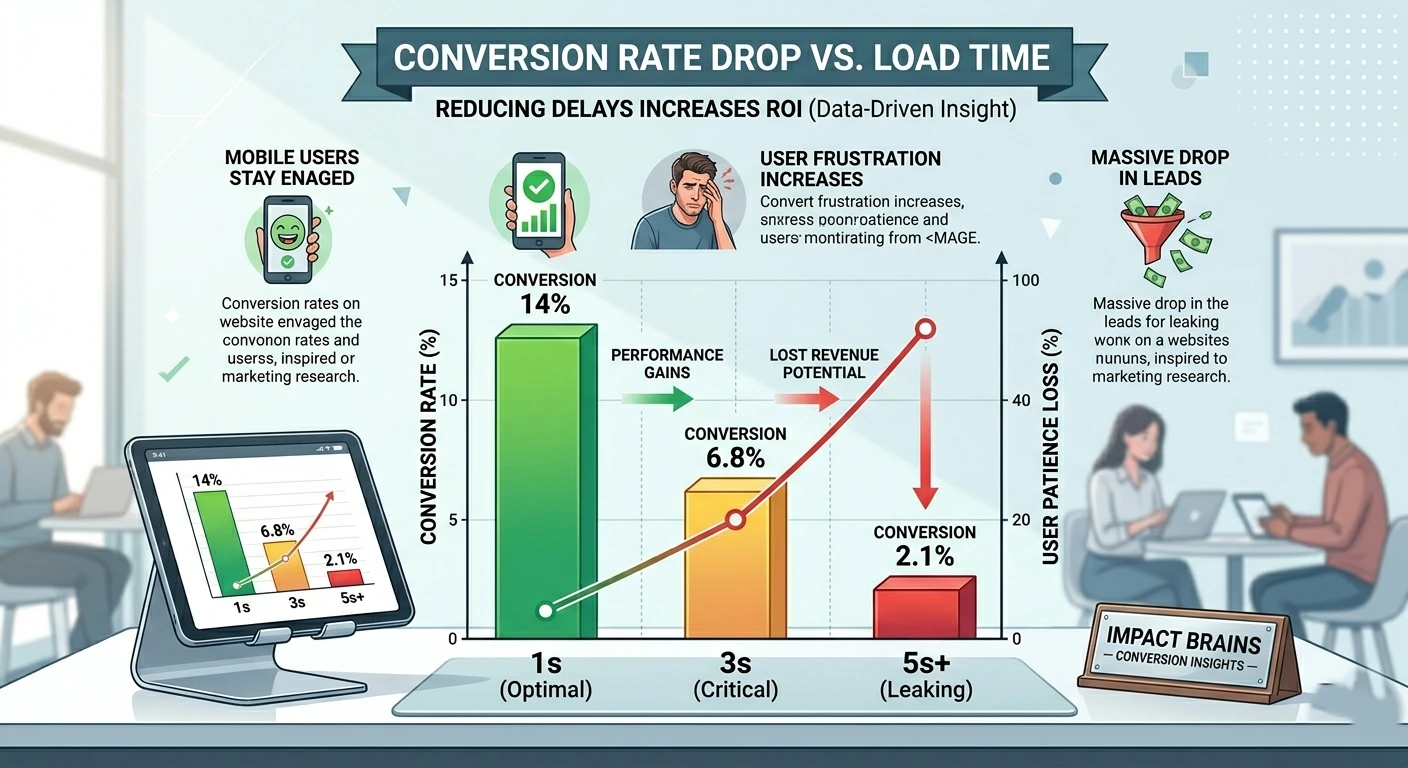
Did you know that just a 1-second delay in page load time can cut conversions by around 7%? When load times stretch from 1 to 5 seconds, the chances of someone bouncing off your page skyrocket by a staggering 90%.
Google has pointed out that in the retail sector, a mere 1-second delay on mobile can slash conversions by as much as 20%.
Pages that load in under 2-3 seconds tend to see significantly better conversion rates, and many top performers strive for that sweet spot of under 3 seconds on mobile.
Picture this: you’re running a campaign with a monthly budget of $5,000.
Those tiny percentage losses can quickly snowball into thousands of dollars wasted on ads and lost revenue each month.
That’s the magic of speed.
Request a free Website Performance Audit →
Core Web Vitals: Google’s Speed Report Card
Google doesn’t just care about overall load time anymore. They use Core Web Vitals to measure real user experience:
- Largest Contentful Paint (LCP): How quickly the main content loads (aim for under 2.5 seconds).
- Interaction to Next Paint (INP): How responsive the page feels to clicks/taps.
- Cumulative Layout Shift (CLS): How stable the page is (no annoying jumps as elements load).
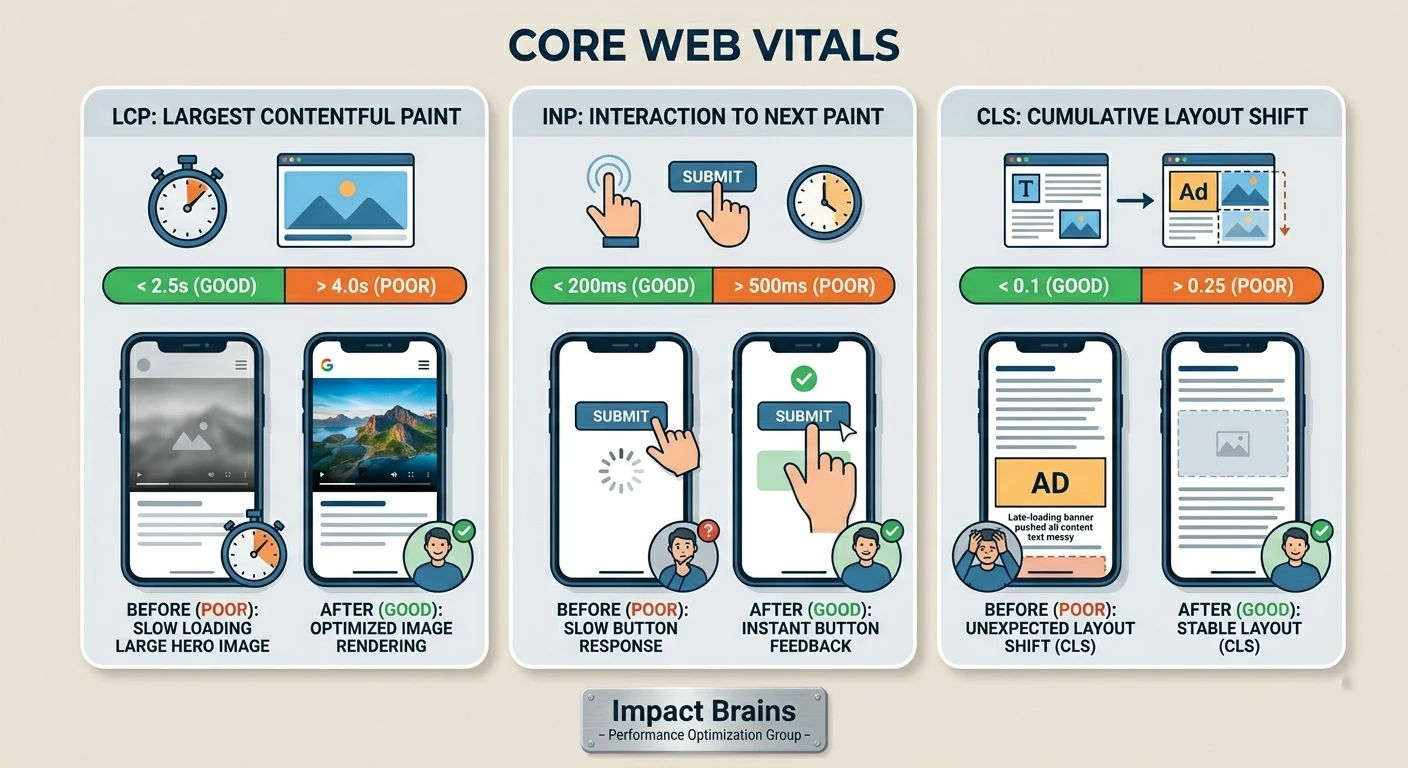
These metrics feed into both organic rankings and your landing page experience for ads. Poor scores signal to Google that users are frustrated — and that hurts your paid performance too.
How to Diagnose and Fix Your Speed Issues (Actionable Checklist)
Don’t just read this — audit your site today.
Step 1: Test It
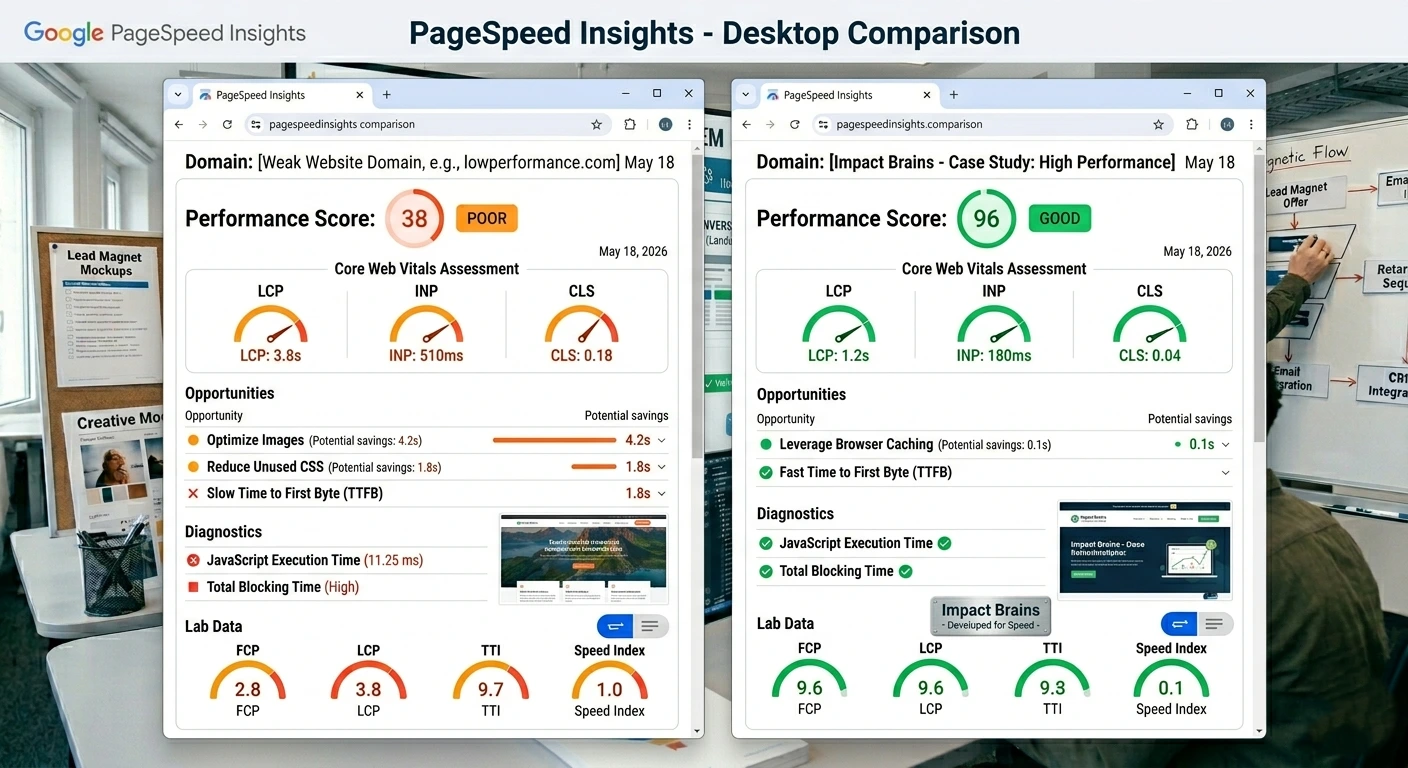
Start by running your landing pages through Google PageSpeed Insights (pagespeed.web.dev).
For a deeper dive, use GTmetrix or WebPageTest, especially to get insights from mobile locations. Don’t forget to check mobile separately — most of your ad traffic is likely coming from mobile users.
Step 2: Common Culprits and Quick Wins
Images: Make sure to compress them, switch to next-gen formats like WebP, and lazy load any offscreen images.
This is often the biggest issue.
JavaScript & CSS: Minify your files, cut out any unused code, and defer non-critical JavaScript. Hosting/Server: Consider switching to a faster hosting provider or enabling caching/CDN (Cloudflare is a popular and effective choice).
Third-party scripts: Be ruthless — do you really need all those tracking pixels loading right away?
Design choices: Ensure that your above-the-fold content loads instantly and keep the initial page weight light.
Step 3: Advanced Moves
Implement browser caching and a CDN.
If it fits your needs, consider using AMP for certain campaigns (though it’s not always necessary these days).
Think about using a lightweight framework or static site elements for your landing pages. If possible, test with real users to get their feedback. Aim for PageSpeed scores in the 90+ range whenever you can, especially on mobile.
Even a jump from “poor” to “average” can significantly boost your ad performance!
Final Thoughts: Speed Is a Competitive Advantage
Chances are, your competitors are busy optimizing their ads but overlooking the importance of speed.
By improving your site’s speed, you’re not just making a smart move; you’re setting yourself up for a win-win situation: lower costs thanks to better Quality Scores and increased conversions from satisfied visitors.
Don’t let slow pages drain your budget.
Take some time this week to audit your landing pages, make the necessary adjustments, and watch your Google Ads performance soar.
The best part? Many of these speed enhancements are one-time fixes that keep delivering results month after month.
What’s the load time on your most crucial landing page right now? Share it in the comments—I’d love to hear from you and maybe offer a quick tip or two.
If you found this information useful, pass it along to your team or fellow marketers who might be struggling with their ad ROI.

And if you need assistance with these changes, don’t hesitate to reach out. A faster site means happier users, better ads, and ultimately, more profit. Let’s make it happen!